
Kwikpic - Smart Photo Sharing
Smart Photo Sharing For Event Guests.
Rating
3.9
Installs
1,000,000+
Price
Free
Screenshots

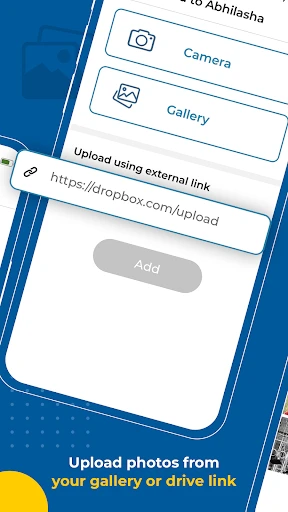

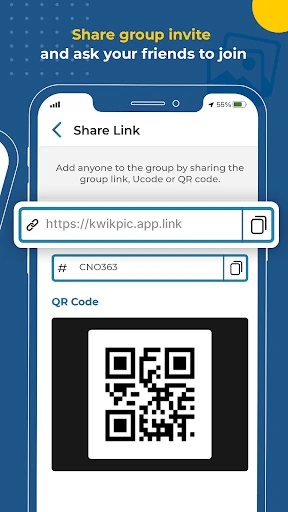
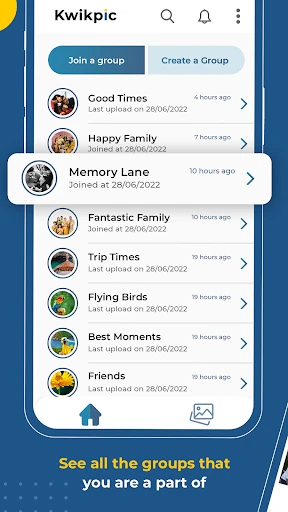
Introducing Kwikpic - Smart Photo Sharing
Effortless Onboarding and Navigation
Upon downloading Kwikpic, users are greeted by an intuitively clean interface. The design prioritizes simplicity, eliminating clutter and making navigation straightforward. Uploading photos is a seamless process, requiring only a few taps to prepare images for sharing with selected contacts.
Intelligent and Automated Features
Kwikpic's core strength is its intelligent sharing capability. The app utilizes smart technology to analyze photo content, location data, and recognized faces to suggest relevant recipients. For instance, a group photo from an event can trigger immediate suggestions to share with those pictured, functioning as a personalized sharing assistant.
The app further simplifies photo management through automatic album creation. It organizes images into event-based collections, eliminating the need to manually sort through countless photos to relive specific memories like vacations or gatherings.
Community and Performance
Beyond simple sharing, Kwikpic fosters interaction through community features like comments and likes. The app also supports private groups for more personal sharing, ensuring photo visibility is carefully controlled. Notably, Kwikpic handles high-resolution images efficiently, maintaining quality without compromising upload/download speeds or overall app performance.
Final Assessment
In extended use, Kwikpic - Smart Photo Sharing proves to be a valuable tool for streamlining photo sharing. It combines a user-friendly design with clever automation and robust performance. While it may not dominate the market, its unique feature set and reliability make it a compelling alternative.
For those dissatisfied with cumbersome photo apps, Kwikpic offers a refined and effective solution that has the potential to fundamentally improve how you share memories.
Pros
- • Easy photo sharing with friends
- • Automatic photo organization
- • Secure cloud storage
- • User-friendly interface
- • Supports various photo formats
Cons
- • Limited free storage space
- • Requires internet for full functionality
- • Occasional app crashes
- • No video support
- • Ads in free version
Frequently Asked Questions
Q: What is Kwikpic and how does it work?
A: Kwikpic is a smart photo-sharing application designed to simplify the process of sharing photos with friends and family. The app uses advanced algorithms to automatically sort and categorize your photos, making it easier for users to find and share images. Users can create albums, invite friends, and share photos seamlessly, ensuring everyone stays connected through shared memories.
Q: Is Kwikpic available for both Android and iOS devices?
A: Yes, Kwikpic is available for both Android and iOS devices. Users can download the app from the Google Play Store for Android devices and the Apple App Store for iOS devices. The app is designed to provide a consistent experience across platforms, ensuring that users can share and view photos regardless of the device they are using.
Q: Does Kwikpic offer any privacy features for shared photos?
A: Kwikpic prioritizes user privacy by offering several privacy features. Users can control who has access to their photos by setting specific permissions for albums and individual pictures. The app also allows users to share photos with specific contacts or groups, ensuring that only the intended recipients can view the shared content. These privacy controls help protect users' personal photos from unauthorized access.
Q: Can I edit photos within the Kwikpic app before sharing them?
A: Yes, Kwikpic includes a variety of editing tools that allow users to enhance their photos before sharing. Users can apply filters, crop images, adjust brightness, and make other modifications directly within the app. These editing features help users create visually appealing photos that they can share with their friends and family, all without needing to use external photo editing software.
Q: Are there any subscription fees or in-app purchases in Kwikpic?
A: Kwikpic offers a free version with basic features, but users can also opt for a premium subscription to access additional features. The premium version may include advanced editing tools, increased storage capacity, and ad-free usage. Users should review the pricing and features of the subscription options within the app to determine if the premium version suits their needs. In-app purchases are optional and designed to enhance the user experience.
Information
Similar Apps

All Invitation Card Maker App
Events

Invitation Maker-Card Creator
Events

Cake Maker: Happy Birthday
Events

MOD Bus Simulator Indonesia
Events

Epic Freebie Games Radar
Events

Яндекс Афиша — билеты
Events

AllEvents - Discover Events
Events

Hobnob - Invitation Card Maker
Events






