
Google Meet
Google Meet Secure Video Meetings For Teams Anywhere.
Rating
4.5
Installs
10,000,000,000+
Price
Free
Screenshots
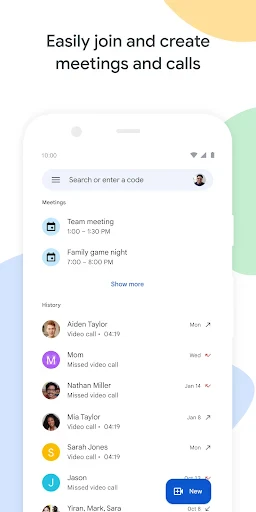


Google Meet: Your Reliable Virtual Meeting Solution
Preparing Your Digital Conference Room
Getting started with Google Meet is straightforward. All that's required is a Google account, which is widely accessible. Once signed in, initiating a meeting is just a few clicks away. Whether for a quick team sync or a formal client presentation, the platform is ready. Simply select "New Meeting" and your virtual space is active.
Features Designed for Enhanced Collaboration
The platform includes several powerful features to improve communication. Live captions stand out for clarifying speech across accents or poor audio, and they serve as an excellent reference for note-taking. Screen sharing is another robust tool, enabling seamless presentation of slides, documents, or other visual materials directly within the call.
Additionally, the background blur functionality is invaluable. It allows users to maintain privacy and professionalism by obscuring their surroundings, ensuring the focus remains on the participant rather than their environment.
Consistent and High-Quality Performance
In terms of reliability, Google Meet delivers stable performance. It comfortably supports calls with numerous participants while maintaining high-definition video and clear audio, assuming a consistent internet connection. This dependability is crucial for important meetings. The service is also accessible via mobile apps, allowing participation from virtually any location.
Prioritizing Security and Access Control
Security is a fundamental aspect, and Google Meet addresses this with multiple layers. All meetings are encrypted, and hosts have granular control over entry through an admission system. This effectively manages participant access and prevents interruptions.
The meeting lock function provides further security by blocking new entrants after a session begins. This feature acts as a digital safeguard for your conference, ensuring discussions remain confidential and focused.
Final Overview
In summary, Google Meet is a comprehensive and dependable video conferencing platform. It combines an intuitive interface with a robust feature set, all powered by Google's secure infrastructure. For both professional and personal use, it transforms virtual meetings into a seamless and productive experience.
Experience It Firsthand
Consider exploring Google Meet for your next virtual gathering. You may find it streamlines your communication workflow effectively. Enjoy connecting.
Pros
- • Easy to use interface
- • High-quality video calls
- • Integration with Google Calendar
- • Supports large group meetings
- • Reliable performance
Cons
- • Requires a Google account
- • Limited features without subscription
- • Occasional connectivity issues
- • Consumes significant data
- • Lacks advanced meeting tools
Frequently Asked Questions
Q: What is Google Meet and how is it different from Google Hangouts?
A: Google Meet is a video conferencing service from Google that allows users to host and join virtual meetings. Unlike Google Hangouts, which was designed for casual conversations, Google Meet offers features tailored for business and professional use, such as larger meeting sizes, real-time captions, and better security features. It's part of Google's G Suite productivity platform.
Q: Is Google Meet free to use, and are there any limitations?
A: Yes, Google Meet offers a free tier that provides basic video conferencing features. However, there are limitations, such as a maximum of 100 participants per meeting and a 60-minute time limit for group calls. For extended features like more participants, longer meeting durations, and advanced administrative controls, users can opt for a paid G Suite subscription.
Q: What are the system requirements for using Google Meet on different devices?
A: Google Meet can be accessed on a variety of devices, including computers, tablets, and smartphones. On computers, it requires a modern browser like Chrome, Firefox, or Safari. For mobile devices, the Google Meet app is available on both Android and iOS. A stable internet connection and a functioning webcam and microphone are essential for optimal performance.
Q: How secure is Google Meet for hosting sensitive meetings?
A: Google Meet is designed with robust security measures to protect users' data and privacy. Meetings are encrypted in transit, and various anti-abuse measures are in place, such as complex meeting codes and optional two-step verification. Google’s commitment to privacy and compliance with international standards makes it a reliable choice for hosting sensitive meetings.
Q: Can I record meetings in Google Meet, and how can I access the recordings?
A: Recording meetings in Google Meet is a feature available to G Suite users, allowing them to capture video, audio, and presentations for later reference. To record a meeting, the host must enable the recording option. Once the meeting ends, the recording is saved to the host’s Google Drive, and a link is emailed to the organizer and participants.
Information
Similar Apps

Messenger Kids – The Messaging
Communication

CastChat - Match & Voice Chat
Communication

Watch Duty (Wildfire)
Communication

Boost Mobile
Communication

Messages - sms text message
Communication

Rebtel: Recharges And Calls
Communication

Psiphon: Fast and Secure VPN
Communication

Phone Call App & WiFi Call Any
Communication






