
OBD Fusion (Car Diagnostics)
Car Diagnostics App For Vehicle Owners.
Rating
4.4
Installs
50,000+
Price
$4.99
Screenshots
What is OBD Fusion?
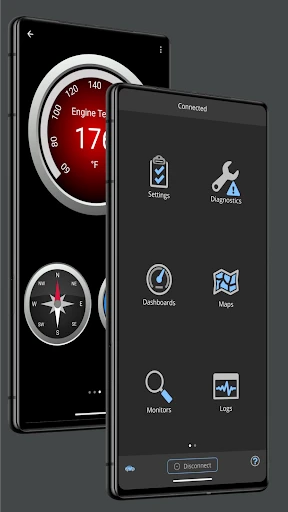
OBD Fusion is a powerful car diagnostics application for Android and iOS that transforms your smartphone into a detailed vehicle health monitor. It provides car owners and enthusiasts with deep, real-time insights into their vehicle's performance and systems.
Initial Setup and Requirements
To begin, you will need an OBD-II adapter. Plug this adapter into your vehicle's OBD-II port (the app offers guidance to locate it) and then pair the adapter with your phone via Bluetooth or Wi-Fi. Once connected, the app is ready to communicate with your car.
Core Diagnostic Features
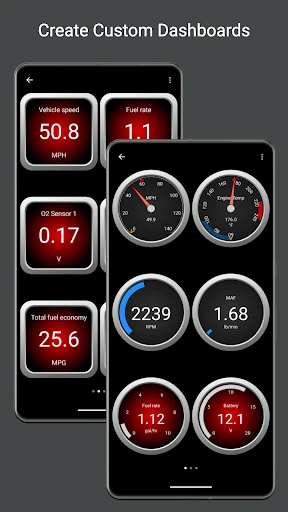
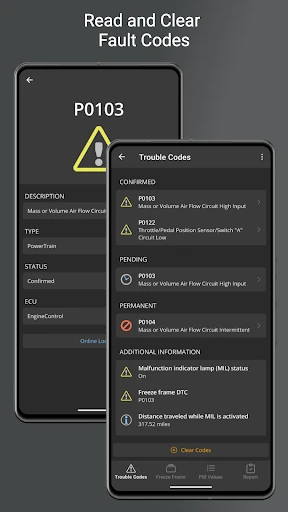
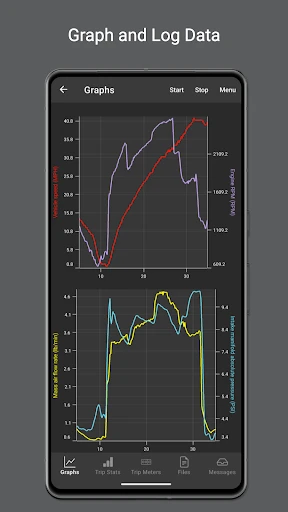
The app's primary functions include reading and resetting diagnostic trouble codes, as well as displaying live data streams. You can monitor metrics such as vehicle speed, engine RPM, coolant temperature, and calculated fuel economy, helping to identify potential issues early and optimize driving efficiency.
Customizable Dashboards
A standout feature is the fully customizable dashboard interface. You can create personalized displays focused on specific data points, from essential engine parameters to advanced sensor readings, effectively building a tailored instrument panel for your vehicle.
User Experience and Support
OBD Fusion is designed for accessibility, featuring an intuitive layout and clear navigation. It provides plain-English explanations for trouble codes, demystifying complex diagnostics. The app is backed by responsive customer support to assist with any technical questions.
Vehicle Compatibility and Development
The application supports a wide range of vehicle makes and models. Developers consistently release updates to ensure ongoing compatibility with new vehicles and to adhere to evolving automotive diagnostic protocols.
Final Summary
In conclusion, OBD Fusion is a comprehensive and user-friendly diagnostic tool suitable for both everyday drivers and automotive enthusiasts. By delivering detailed, actionable data directly to your phone, it empowers you to maintain your vehicle proactively, potentially reducing repair costs and enhancing your understanding of its operation.
Pros
- • Comprehensive real-time car diagnostics.
- • User-friendly interface with easy navigation.
- • Customizable dashboards for personalized view.
- • Supports multiple vehicle brands and models.
- • Regular updates enhance functionality.
Cons
- • Requires a compatible OBD-II adapter.
- • Advanced features may need in-app purchases.
- • Initial setup can be time-consuming.
- • Some data may overwhelm casual users.
- • Limited support for older car models.
Frequently Asked Questions
Q: What is OBD Fusion and how does it work?
A: OBD Fusion is a powerful car diagnostic tool that connects to your vehicle's OBD-II port, allowing you to monitor and diagnose various aspects of your car's performance. By using Bluetooth or Wi-Fi, it interfaces with your smartphone to provide real-time data on engine health, fuel efficiency, and more, making it an essential tool for car enthusiasts and mechanics alike.
Q: Is OBD Fusion compatible with all vehicles?
A: OBD Fusion is compatible with most vehicles manufactured after 1996 that support the OBD-II standard. However, compatibility may vary based on the make, model, and year of your car. It is advisable to check the app's compatibility list or consult with the manufacturer to ensure your vehicle is supported before downloading the app.
Q: What features does OBD Fusion offer?
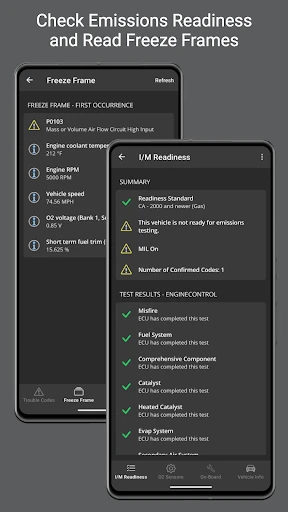
A: OBD Fusion offers a comprehensive suite of features, including real-time performance tracking, diagnostic trouble code (DTC) reading and clearing, customizable dashboards, and fuel economy calculations. Additionally, it provides data logging and export options, allowing users to analyze their vehicle's performance over time and ensure optimal functioning.
Q: How user-friendly is OBD Fusion for beginners?
A: OBD Fusion is designed with a user-friendly interface that caters to both beginners and experienced users. The app provides clear instructions and intuitive navigation, making it easy for users to set up and understand their vehicle's diagnostics. Furthermore, it includes helpful tutorials and customer support to assist users in maximizing the app's potential.
Q: Does OBD Fusion require any additional hardware to function?
A: Yes, OBD Fusion requires an OBD-II adapter to connect your smartphone to the vehicle's diagnostic port. These adapters are available in Bluetooth, Wi-Fi, or USB formats and must be purchased separately. The app works seamlessly with various adapters, but it is important to ensure compatibility with your device and vehicle for optimal performance.
Information
Similar Apps

Call Blocker - Block Numbers
Communication

Opera: Private Web Browser
Communication

JusTalk - Video Chat & Calls
Communication

Adblock Browser: Fast & Secure
Communication

All Email Login
Communication

Messenger - Texting App
Communication

Microsoft Edge: AI browser
Communication

WhatsApp Messenger
Communication






