
Opera: Private Web Browser
Secure Fast Private Browser For Global Users.
Rating
4.8
Installs
100,000,000+
Price
Free
Screenshots

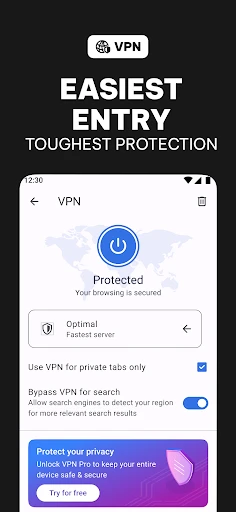


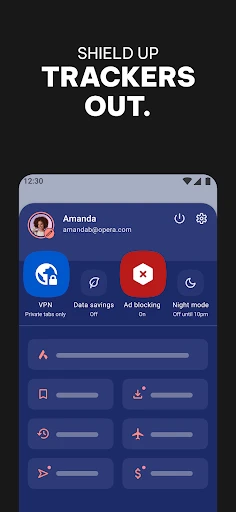
Opera with AI: A Smarter Approach to Web Browsing
Do you feel overwhelmed by a cluttered tab bar and desire a more streamlined online experience? Opera's AI-powered browser addresses this directly. This application transcends a simple web viewer, functioning as an integrated digital assistant designed to navigate the vast internet with both efficiency and style.
Key Features of Opera's AI Browser
Opera distinguishes itself in a crowded field by deeply integrating artificial intelligence into the core browsing experience. This intelligent system adapts to your patterns, progressively offering a more intuitive and personalized journey. Imagine launching your browser to find it already suggests your daily news sources or conveniently opens your frequent social platforms—it delivers a proactive, seamless interaction.
Design and Interface Experience
Opera greets users with a modern, uncluttered interface. Its design prioritizes accessibility, featuring a versatile sidebar for quick navigation to bookmarks, history, and essential tools like the integrated VPN. The AI enhancements complement this aesthetic perfectly, providing context-aware recommendations and shortcuts that feel assistive, not intrusive.
Performance and Speed Efficiency
Performance is paramount, and Opera excels with its responsive speed. The AI contributes by predicting likely next steps and pre-loading content, which minimizes wait times and keeps you in flow. Additionally, its robust data compression technology makes it an excellent choice for conserving bandwidth on limited data plans.
Integrated Suite of Productivity Tools
Opera with AI enhances your entire digital workflow. It comes equipped with a native ad blocker, a power-saving mode for laptops, and even a built-in crypto wallet. The AI optimizes these utilities by learning your habits, effectively creating a browser that anticipates your needs.
Features like "My Flow" simplify cross-device work, allowing effortless sharing of links, files, and notes between your computer and phone. The AI further refines this by proposing items for transfer based on your recent activity, eliminating the need for clumsy workarounds.
Commitment to Privacy and Security
In an era of growing digital concerns, Opera embeds security into its AI foundation. The built-in VPN and ad blocker help shield your identity from trackers, while the AI continuously updates protective measures against emerging threats. You can browse with confidence, knowing proactive safeguards are working to secure your personal data.
For those seeking an intelligent, fast, and secure browser, Opera with AI presents a compelling option. It combines advanced technology with thoughtful design to craft a web experience that is both enjoyable and effective. Give it a try—you might wonder how you browsed without it.
Pros
- • AI-enhanced browsing experience
- • Efficient ad-blocking feature
- • Customizable UI themes
- • Fast page loading speeds
- • Integrated social media tools
Cons
- • Limited extension library
- • Occasional compatibility issues
- • High RAM usage
- • Infrequent updates
- • Lacks advanced privacy features
Frequently Asked Questions
Q: What are the key features of the Opera browser with AI?
A: Opera with AI comes packed with features designed to enhance your browsing experience. It includes an integrated AI assistant that helps you find information quickly, a built-in ad blocker to improve page loading times, and a VPN for increased privacy. Additionally, it supports customizable workspaces, allowing users to organize tabs efficiently. These features make Opera a compelling choice for users seeking a modern browsing solution.
Q: How does the AI integration in Opera enhance user experience?
A: The AI integration in Opera significantly enhances the user experience by providing intelligent suggestions and search results tailored to your browsing habits. It helps in automating repetitive tasks, offering quick access to relevant information, and ensuring a smoother navigation process. The AI assistant can also provide insights and recommendations based on your interests, making your browsing more personalized and efficient.
Q: Is it safe to use the VPN feature in Opera?
A: Yes, it's safe to use Opera's built-in VPN feature. This VPN is designed to protect users’ privacy by encrypting internet traffic and masking IP addresses, making it difficult for third parties to track your online activities. However, it's worth noting that while Opera provides a good level of privacy, it may not offer the same level of security as premium VPN services. Therefore, users should consider their specific needs when deciding on a VPN solution.
Q: Can I customize the Opera browser to suit my needs?
A: Absolutely, Opera offers extensive customization options to suit individual user preferences. Users can personalize their browsing experience by adjusting themes, creating custom shortcuts, and utilizing the sidebar for quick access to favorite tools and websites. Workspaces allow for organizing tabs into different categories, improving productivity and decluttering the browser interface. These features make it easy for users to tailor Opera to their specific needs.
Q: What are the system requirements for installing Opera on mobile devices?
A: Opera is designed to be lightweight and compatible with a wide range of mobile devices. For Android, it usually requires at least version 5.0 (Lollipop) or higher, while iOS users need version 11.0 or later. Users should ensure their device meets these requirements for optimal performance. Additionally, having adequate storage space and a stable internet connection will enhance the overall functionality and user experience when using Opera.
Information
Similar Apps

Good Morning Wishes
Communication

Reolink
Communication

FAB Adblocker Browser:Adblock
Communication

Sound Amplifier
Communication

All Email Login
Communication

Messages - sms text message
Communication

Proton Mail: Encrypted Email
Communication

Phone by Grice
Communication






