
Gruveo - Video Conferencing
Gruveo Video Conferencing Simple Secure Business Meetings.
Rating
3.3
Installs
500,000+
Price
Free
Screenshots


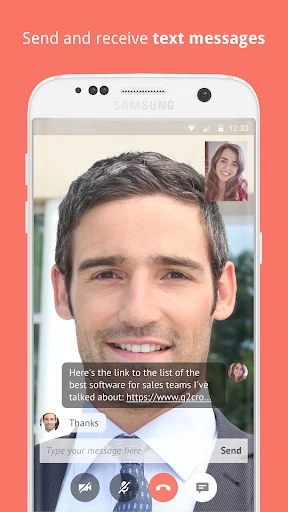
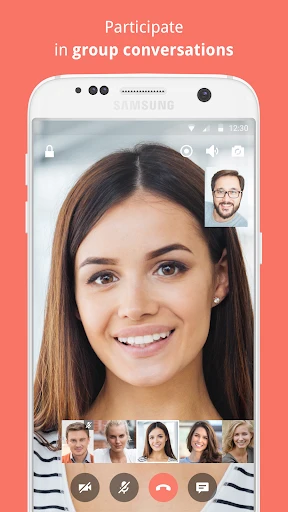

Gruveo: A Distinctive Choice for Video Calls
As virtual connection evolves from a trend into a necessity, Gruveo establishes itself as a significant option among video conferencing tools. It caters to diverse needs, from informal chats with friends to formal business discussions and online gatherings. After testing the app, I can outline the qualities that help Gruveo distinguish itself in a competitive landscape.
Effortless Setup Process
Getting started with Gruveo is remarkably straightforward. The platform requires no software downloads or complex installations, a major advantage for users of all technical levels. You generate a unique call link, send it to your participants, and the meeting is ready. This ease of use is a welcome change in an environment where many applications involve lengthy setup procedures.
Intuitive and Uncluttered Interface
Gruveo's clean design is one of its most appealing aspects. The interface prioritizes user experience, featuring a logical layout that simplifies navigation. Its minimalist approach avoids overwhelming users with excessive features while still providing all essential tools for an effective video conference.
Consistently High-Quality Communication
The core of any video conferencing tool is performance, and Gruveo excels in this area. It delivers excellent video and audio clarity, facilitating smooth and uninterrupted meetings. The app intelligently adjusts to varying internet speeds, optimizing the call quality whether your connection is strong or less reliable. It effectively eliminates the common frustrations of lagging video or unclear sound.
Prioritizing Security and Privacy
At a time when digital privacy is paramount, Gruveo demonstrates a strong commitment to security. All calls are protected with encryption, ensuring your conversations stay confidential. This is a critical feature for professional users handling sensitive data, offering confidence that their information is secure.
Importantly, Gruveo maintains this high security standard without compromising on call performance—a balance that many competing services struggle to achieve. The app deserves recognition for safeguarding user privacy while providing a top-tier service.
Final Impressions
In summary, Gruveo is an excellent solution for anyone seeking a hassle-free video conferencing experience. Its combination of an intuitive design, reliable high-quality calls, and strong security measures positions it as a compelling choice. While many alternatives exist, Gruveo's straightforward approach and consistent performance make it a service worthy of serious consideration.
Whether you are organizing an online family event or leading an important corporate discussion, Gruveo is a capable and dependable partner. Try it for yourself; it may well become your preferred application for all video communication needs.
Pros
- • Easy to set up and use.
- • High-quality video and audio.
- • No account required for guests.
- • Secure with end-to-end encryption.
- • Cross-platform compatibility.
Cons
- • Limited free plan features.
- • Occasional connectivity issues.
- • No virtual background option.
- • Requires stable internet connection.
- • Less popular than other platforms.
Frequently Asked Questions
Q: What platforms does Gruveo support for video conferencing?
A: Gruveo is a versatile video conferencing app that supports both Android and iOS platforms, making it accessible for a wide range of users. Additionally, it can be used on desktop browsers, providing flexibility for those who prefer using a PC or Mac for their video calls. The app ensures seamless connectivity across devices.
Q: Is it necessary to create an account to use Gruveo?
A: No, one of the standout features of Gruveo is that it does not require users to create an account to start a video call. This feature enhances user privacy and convenience, allowing users to quickly initiate or join meetings without the hassle of registration or remembering login credentials.
Q: How secure is Gruveo for video calls?
A: Gruveo prioritizes user security by implementing end-to-end encryption for all video calls. This ensures that conversations remain private and protected from unauthorized access. The app uses industry-standard security protocols to safeguard user data, making it a reliable choice for secure communications.
Q: Can I share my screen during a Gruveo video call?
A: Yes, Gruveo offers a screen sharing feature that is simple to use. This is particularly useful for business meetings, online presentations, and technical support scenarios. Users can easily share their screen with others in the call, enhancing collaboration and making it easier to convey information visually.
Q: Does Gruveo offer a free version, and what are its limitations?
A: Gruveo does offer a free version, which includes essential video conferencing features. However, there might be limitations such as the number of participants allowed in a call or the duration of a meeting. For users requiring advanced features or higher participant limits, Gruveo offers premium plans that can be purchased.
Information
Similar Apps

Watch Sync App - BT Notifier
Communication

LINE: Calls & Messages
Communication

Link Messenger
Communication

Yolla: International Calling
Communication

Samsung Accessory Service
Communication

Kik — Messaging & Chat App
Communication

Kiwi Browser - Fast & Quiet
Communication

Zangi Private Messenger
Communication






