
Sticker.ly - Sticker Maker
Create Custom Stickers For Social Chats.
Rating
4.6
Installs
100,000,000+
Price
Free
Screenshots
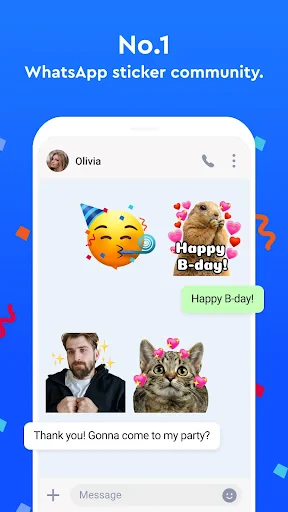


Sticker.ly: Create Custom Stickers for Expressive Messaging
Calling all sticker enthusiasts! Tired of scrolling through endless packs to find the perfect sticker? Your search ends here. Sticker.ly transforms how you communicate, offering Android and iPhone users a powerful yet simple tool to design and share unique stickers that capture your personal style and every mood.
Intuitive and Effortless Setup
Getting started with Sticker.ly could not be easier. The app boasts a user-friendly design that welcomes everyone, regardless of technical skill. Upon downloading, you’ll encounter a clean, intuitive home screen that guides you immediately into the creative process. With no complex menus or clutter, you can begin crafting amazing stickers in moments.
Powerful, Creative Features at Your Fingertips
Sticker.ly shines with its versatile toolkit, perfect for both novices and expert creators. Transform your personal photos or choose from an extensive library of templates. The precision cut-out tool ensures clean, professional edges for your stickers. Further personalize them with text, emojis, and freehand drawings to match any vibe, from playful to polished.
A standout feature is the intelligent auto-cut tool. It instantly detects the primary subject in your image and separates it from the background. This incredible time-saver converts even complex photos into ready-to-use stickers in seconds—a feature you’ll soon find indispensable.
Share and Discover in a Vibrant Community
Sticker.ly goes beyond personal creation to foster a dynamic sharing community. Directly send your stickers to friends or publish them for the entire Sticker.ly community to enjoy and use. Explore and download stickers made by others, providing endless inspiration and a constant stream of fresh content.
The seamless WhatsApp integration is a game-changer. With a single tap, export your custom stickers directly to WhatsApp, effortlessly elevating your chats with exclusive designs. Move beyond generic stickers and make every conversation uniquely yours.
Conclusion: The Go-To App for Sticker Lovers
In summary, Sticker.ly is an essential download for anyone who uses stickers to express themselves. It combines an accessible interface with robust creative capabilities and a thriving community. Whether your goal is to personalize your messages or simply enjoy the art of sticker making, Sticker.ly delivers an exceptional experience.
Don’t hesitate—dive into Sticker.ly today and unleash your creativity. Your messaging is about to become infinitely more engaging and fun.
Pros
- • Easy to use interface
- • Wide variety of sticker packs
- • Fast sharing options
- • Supports animated stickers
- • Regular updates
Cons
- • Contains ads
- • Some stickers need payment
- • Limited editing tools
- • Occasional app crashes
- • Requires internet for full features
Frequently Asked Questions
Q: What is Sticker.ly - Sticker Maker and what does it do?
A: Sticker.ly - Sticker Maker is a creative app that allows users to create custom stickers for various messaging platforms. With an intuitive interface, users can design personalized stickers using photos, text, and graphics. The app also offers a vast library of stickers that can be downloaded and used instantly. Ideal for enhancing conversations, Sticker.ly provides tools for creativity and expression.
Q: Is Sticker.ly - Sticker Maker free to use, or are there any in-app purchases?
A: Sticker.ly - Sticker Maker is free to download and use, with a range of features accessible at no cost. However, it does offer in-app purchases for premium content and additional features. Users can opt for these purchases to unlock exclusive sticker packs, remove ads, and access other advanced tools, providing a richer experience.
Q: How can I share my created stickers using Sticker.ly?
A: Sharing stickers made with Sticker.ly is straightforward. Once you've created your stickers, the app provides options to export them directly to popular messaging apps like WhatsApp and Telegram. Simply select your desired sticker pack and follow the on-screen instructions to add them to your messaging app, making your chats more vibrant and personal.
Q: Can I use my own photos to create stickers in Sticker.ly?
A: Yes, Sticker.ly allows you to use your own photos to create unique stickers. The app offers editing tools that enable you to cut out parts of your photos, add text, and use various effects to enhance your stickers. This feature ensures that users can personalize their stickers to reflect their style and creativity.
Q: Is Sticker.ly - Sticker Maker available on both Android and iOS platforms?
A: Sticker.ly - Sticker Maker is available on both Android and iOS platforms, making it accessible to a wide range of users. The app can be downloaded from the Google Play Store for Android devices and the Apple App Store for iOS devices. It is designed to work seamlessly on both platforms, ensuring a smooth user experience.
Information
Similar Apps

Recover Deleted Messages App
Communication

Google Meet
Communication
Opera Mini: Fast Web Browser
Communication

Incognito Browser - Go Private
Communication

Adblock Browser: Fast & Secure
Communication

Sideline: 2nd Phone Line App
Communication

Messages: Text SMS
Communication

Messages: Text Message, SMS
Communication






