
SeatGeek – Tickets to Events
Find Tickets For Live Sports And Concerts.
Rating
4.2
Installs
5,000,000+
Price
Free
Screenshots

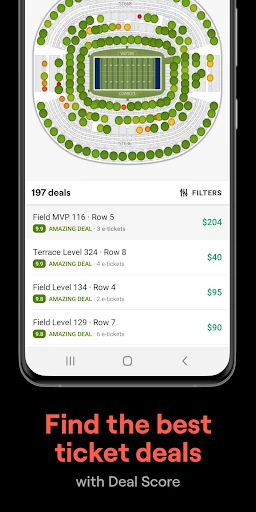
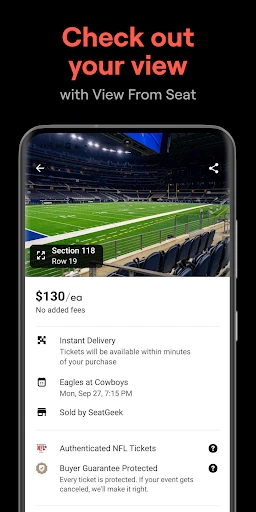
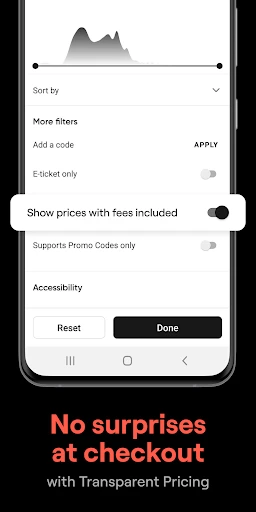

Welcome to the world of live events with SeatGeek – the essential app for ticket seekers. For concert enthusiasts, sports supporters, and theater lovers alike, SeatGeek ensures you always have access to the best experiences. After exploring the app, here is my overview.
Effortless Event Discovery
SeatGeek immediately stands out with its polished and intuitive interface. The design is clean and navigable, functioning like a dedicated guide to your interests. Searching by performer, team, or location yields rapid, relevant results, streamlining your path to the perfect event.
Intelligent Features for Informed Decisions
A standout tool is the interactive seating map. This feature allows you to visually assess seat locations, compare pricing, and preview the sightline from any section before purchasing. It eliminates the guesswork and helps secure the ideal spot.
The Deal Score system further empowers your choice. This algorithm evaluates ticket value by analyzing price, seat quality, and historical trends, providing a clear indicator of whether an offer is financially sound.
Key Benefits for Users
Personalization is central to the experience. By following favorite artists and teams, you receive timely alerts for new events. Integration with your digital calendar also simplifies managing your schedule, consolidating your plans in one place.
For spontaneous decisions, SeatGeek excels in offering last-minute ticket options. This provides flexibility to discover and attend events on short notice, often at accessible prices.
Final Impressions
In summary, SeatGeek is a comprehensive and dependable platform for event discovery and ticket purchasing. Its combination of a thoughtful design, practical tools, and reliable service makes it a top choice. For anyone passionate about live entertainment, downloading SeatGeek is a step toward your next memorable outing.
Pros
- • Easy-to-use interface
- • Comprehensive event listings
- • Secure ticket purchasing
- • Flexible payment options
- • Instant ticket delivery
Cons
- • Service fees can be high
- • Limited customer support
- • Occasional app crashes
- • Delayed refund process
- • Not all venues covered
Frequently Asked Questions
Q: What is SeatGeek and how does it work?
A: SeatGeek is a mobile app designed to help users find and purchase tickets for a wide range of events, including concerts, sports, theater, and more. The app aggregates ticket listings from various sellers, providing users with a comprehensive selection. It features an intuitive interface that allows users to search for events by location, venue, artist, or team, and compare prices to find the best deals. Additionally, SeatGeek's interactive seating charts and Deal Score system help users identify the best seats available for their budget.
Q: How does SeatGeek ensure the authenticity of tickets?
A: SeatGeek has a strong focus on ensuring that all tickets sold through its platform are legitimate and valid. The app partners with reputable sellers and employs a rigorous verification process to protect users from fraudulent tickets. Additionally, SeatGeek offers a Buyer Guarantee, which provides customers with a full refund or replacement in the event that any issues arise with their tickets, ensuring peace of mind while purchasing.
Q: What fees should I be aware of when purchasing tickets on SeatGeek?
A: When purchasing tickets through SeatGeek, users should be aware that additional fees may be applied to the total ticket price. These fees can include service charges and delivery fees, which are added during the checkout process. SeatGeek is transparent about these costs, displaying them clearly before users finalize their purchase. It's important for users to review these additional charges to understand the full cost of their tickets before completing the transaction.
Q: Can I sell my tickets on SeatGeek if I can no longer attend an event?
A: Yes, SeatGeek provides a platform for users to sell tickets they can no longer use. By listing tickets for sale on SeatGeek, users can reach a large audience of potential buyers. The process is straightforward: users simply need to list their tickets, set a price, and once the tickets sell, SeatGeek handles the transaction and delivery. This feature makes it easy and convenient for users to recoup their costs if plans change.
Q: Does SeatGeek have a mobile app, and what platforms is it available on?
A: Yes, SeatGeek offers a mobile app that enhances the ticket-buying experience by providing convenient access to event listings, interactive seating charts, and personalized recommendations. The app is available for both Android and iOS platforms, allowing a wide range of users to take advantage of its features. With the app, users can easily browse events, purchase tickets, and manage their orders on-the-go, making it a handy tool for any event-goer.
Information
Similar Apps

Wedding Planner by MyWed
Events

MiniCraft Pocket Edition Game
Events

Easy Quran Mp3 Audio Offline
Events

Wedding Invitation Card Maker
Events

POV – Disposable Camera Events
Events

N.EventGo Buddy VC
Events

Invitation card Maker, Design
Events

All Invitation Card Maker App
Events






