Stick Nodes Pro - Animator
Stick Figure Animation For All Ages.
Rating
4.8
Installs
50,000+
Price
$3.99
Screenshots
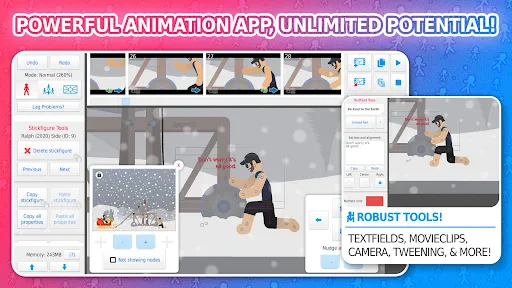
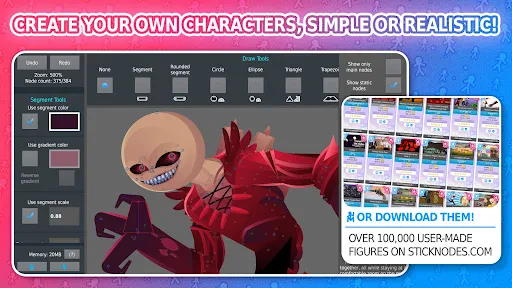
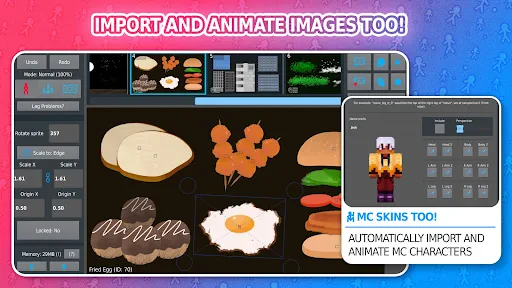
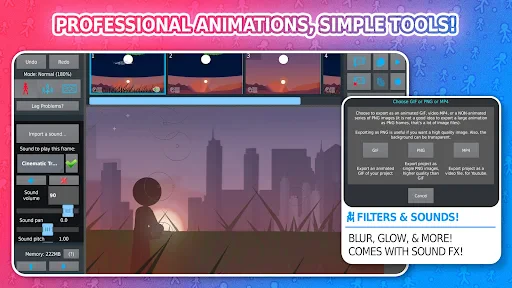
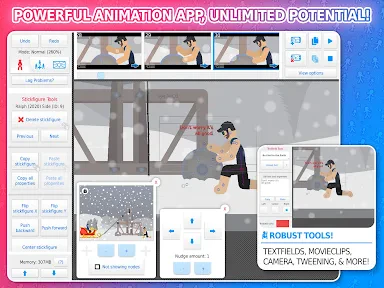
Discover Stick Nodes Pro - Animator: Your Pocket Animation Studio
Calling all animation enthusiasts! Have you dreamed of crafting your own cartoons or short films? Meet Stick Nodes Pro - Animator, a powerful app designed to turn your smartphone into a creative hub for building dynamic stick-figure animations, perfect for beginners and seasoned animators alike.
Navigating the User-Friendly Interface
Starting is intuitive thanks to the app’s clean and logical layout. Upon launching Stick Nodes Pro, you’ll find an interface crafted for clarity, guiding users of all experience levels with ease. You’re greeted by a blank canvas and a basic stick figure—a simple beginning from which your entire animated vision can unfold.
Powerful Features That Set It Apart
Stick Nodes Pro distinguishes itself with a robust and versatile toolkit. Create complex animations using multiple layers, integrate sound effects, and employ a virtual camera to add depth and movement to your scenes. It effectively functions as a complete, portable animation studio right in your hand.
A particularly useful capability is the option to export your projects in various formats, including GIF and MP4. This flexibility makes sharing your creations with friends or uploading them to social media platforms incredibly straightforward.
Crafting Polished and Smooth Animations
When it comes to the animation process itself, the app provides extensive control. You can meticulously adjust your stick figures' proportions, colors, and motions. The onion-skinning tool is essential for smooth results, allowing you to see previous frames as you draw new ones for perfect alignment and flow.
For advanced users, the tweening feature automates the creation of in-between frames for your key poses. This smart function significantly streamlines workflow and saves considerable time during production.
Overcoming the Learning Curve
While feature-rich, mastering all aspects of Stick Nodes Pro can be a journey, especially for those new to animation. However, a supportive and active user community, abundant online tutorials, and responsive developers who incorporate user feedback ensure you have the resources to grow and overcome any initial hurdles.
Final Verdict on Stick Nodes Pro
In summary, Stick Nodes Pro - Animator is a top-tier choice for anyone passionate about animation. Its blend of an accessible entry point, deep feature set, and pure creative fun makes it rewarding for hobbyists and professionals. If you’re ready to bring your ideas to life, give Stick Nodes Pro a try—your next animation adventure awaits.
Pros
- • Intuitive interface for beginners
- • Offers onion skinning feature
- • Supports export to GIF and MP4
- • Extensive library of stick figures
- • Customizable frame rate options
Cons
- • Steep learning curve for complex animations
- • Limited sound editing features
- • Occasional crashes reported
- • Requires in-app purchases for some features
- • No cloud save option
Frequently Asked Questions
Q: What is Stick Nodes Pro - Animator?
A: Stick Nodes Pro - Animator is an advanced animation app designed for both beginners and experienced animators. It allows users to create animated stick figure movies seamlessly on their Android or iOS devices. With a wide range of features, it supports creativity and offers tools for professional-grade animations.
Q: How user-friendly is Stick Nodes Pro for beginners?
A: Stick Nodes Pro is designed with an intuitive interface, making it accessible for beginners while still offering advanced features for experienced users. The app provides tutorials and guides to help new users quickly understand the basics of animation, ensuring a smooth learning curve for everyone.
Q: What features make Stick Nodes Pro stand out?
A: Stick Nodes Pro offers a robust set of features, including a frame-by-frame animation system, sound effects, and export options in multiple formats. It supports onion skinning, automatic frame-tweening, and offers a library of stick figures and backgrounds, making it a comprehensive tool for animators.
Q: Is Stick Nodes Pro suitable for professional animators?
A: Yes, Stick Nodes Pro is suitable for professional animators. It provides detailed frame-by-frame editing, advanced animation tools, and export options suitable for professional use. Its comprehensive features are designed to meet the needs of both amateur and professional animators alike, supporting complex project creation.
Q: What are the system requirements for Stick Nodes Pro?
A: Stick Nodes Pro is available for both Android and iOS devices. It requires Android 5.0 and up or iOS 11.0 or later. The app is optimized for both smartphones and tablets, allowing users to animate on the go without sacrificing performance or quality.