
Amazon Kids Parent Dashboard
Parental Control For Amazon Kids Content.
Rating
4.2
Installs
500,000+
Price
Free
Screenshots
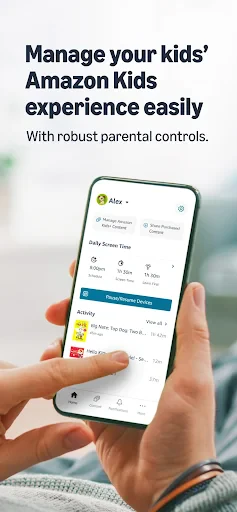
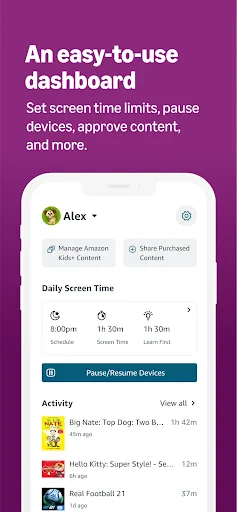
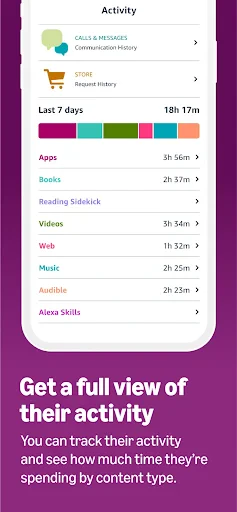
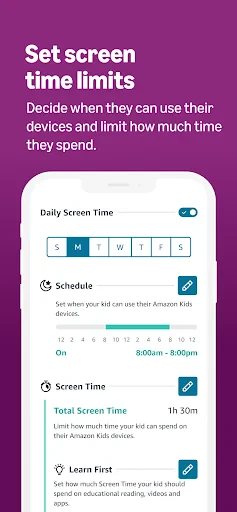
Simplify Parental Oversight with the Amazon Kids Parent Dashboard
Managing your child's digital life no longer needs to feel overwhelming. The Amazon Kids Parent Dashboard transforms this responsibility into a straightforward task, offering parents a central hub to oversee content and activity across Amazon devices.
Effortless Setup and Immediate Control
Setup is quick and requires only your existing Amazon account. Once logged in, you link your child’s devices to your profile, granting you instant visibility and management capabilities over their digital engagement.
Promote Balance with Time and Content Limits
The dashboard empowers you to establish daily screen time limits and learning goals. This feature helps prioritize educational content, ensuring a healthier balance between play and productive screen use.
Gain Detailed Insights into Daily Activity
Receive a comprehensive view of your child's digital day. The dashboard details recent apps, videos, and books, while a daily summary provides a quick snapshot of total screen time and content consumption.
Curate a Safe, Age-Appropriate Experience
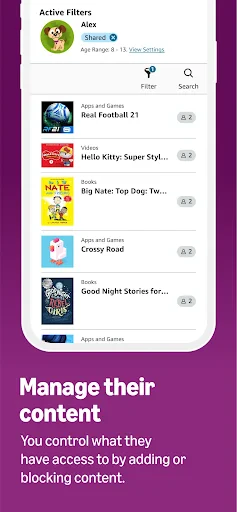
Rest easy with pre-approved content collections tailored to your child’s age. You maintain ultimate approval power, with the ability to personally allow or block any specific book, video, or application.
Intuitive Design for All Tech Skill Levels
Navigating the dashboard is simple, with a clear layout and logically organized controls. Manage all your child’s compatible tablets and Kindles seamlessly from one unified, user-friendly interface.
Instant Pause with the Device Freeze Feature
Instantly lock your child’s device with a single tap for meals, bedtime, or necessary breaks. This tool effortlessly enforces screen-free time without negotiation.
A Vital Tool for Modern Parenting
The Amazon Kids Parent Dashboard is an essential resource for today's parents, providing control and peace of mind. While it complements active parenting, it serves as a powerful ally in guiding your child's digital journey.
Take Command of Your Child's Digital World
For greater insight and management of your child's online activities, the Amazon Kids Parent Dashboard is an invaluable assistant. Once integrated into your routine, you’ll wonder how you managed without it.
Pros
- • Intuitive user interface.
- • Comprehensive parental controls.
- • Easy content management.
- • Multiple child profiles.
- • Detailed activity reports.
Cons
- • Limited educational content.
- • Subscription required for full access.
- • Complex setup for beginners.
- • Limited offline features.
- • Occasional app crashes.
Frequently Asked Questions
Q: What is Amazon Kids Parent Dashboard and how does it work?
A: Amazon Kids Parent Dashboard is an online tool designed to help parents manage their child's experiences on Amazon Kids-enabled devices. It allows parents to monitor activity, set daily time limits, and approve content. The dashboard provides insights into what children are doing, enabling parents to make informed decisions about their child's screen time and content consumption.
Q: How can I access the Amazon Kids Parent Dashboard?
A: To access the Amazon Kids Parent Dashboard, you need an Amazon account. Once logged in, you can navigate to the Parent Dashboard through the Amazon website or the Amazon Kids app. The dashboard is accessible from any device with an internet connection, making it easy for parents to manage settings and monitor activity remotely.
Q: What features does the Amazon Kids Parent Dashboard offer?
A: The Amazon Kids Parent Dashboard offers a range of features designed to give parents control over their child's device use. Key features include setting educational goals, viewing activity reports, managing web browser access, and setting screen time limits. Parents can also choose content appropriate for their child’s age and interests, ensuring a safe and balanced digital environment.
Q: Is the Amazon Kids Parent Dashboard secure and private?
A: Yes, the Amazon Kids Parent Dashboard is designed with security and privacy in mind. Amazon adheres to strict privacy policies to ensure that personal information is safeguarded. Parents can feel confident that their child's data is protected with robust security measures, and that only authorized users have access to the dashboard and its features.
Q: Are there any costs associated with using Amazon Kids Parent Dashboard?
A: The Amazon Kids Parent Dashboard is included with the Amazon Kids+ subscription, which is a paid service. While the dashboard itself does not incur additional costs, the subscription provides access to a wide range of kid-friendly content and features. Parents should consider the subscription fees when evaluating the overall cost of using the service.
Information
Similar Apps

MapleStory Worlds
Entertainment

The Roku App (Official)
Entertainment

DreameShort - Dramas and Shows
Entertainment

Spin the Wheel: Random Picker+
Entertainment

Philo: Shows, Movies, Live TV.
Entertainment

Movies Anywhere
Entertainment

Color Pop - Fun Coloring Games
Entertainment

BALA AI: Character AI Chat App
Entertainment






