
Revive: Animation & AI Photos
Revive Memories With AI Animation For Everyone.
Rating
4.4
Installs
10,000,000+
Price
Free
Screenshots

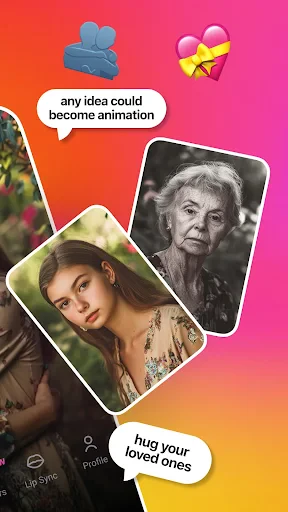
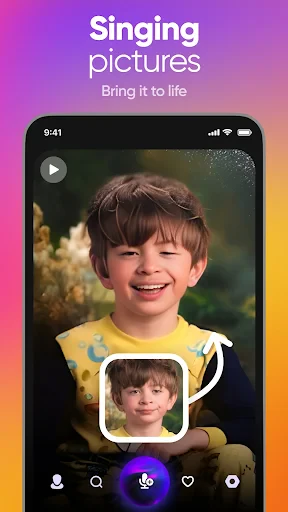
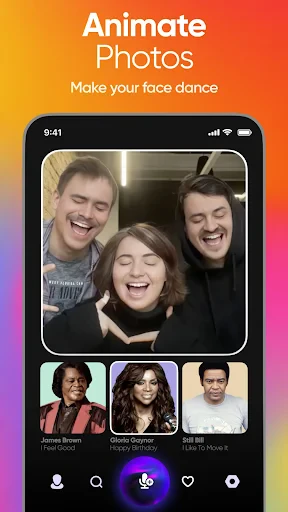

Revive: Animation & AI Photos
Seeking an app that seamlessly blends technology with creative expression? Meet Revive: Animation & AI Photos, a rapidly growing favorite for transforming static images into dynamic animations. After a comprehensive exploration, I can confirm it delivers a genuinely engaging and enjoyable experience.
Animating Imagery Through Artificial Intelligence
At its core, Revive uses advanced artificial intelligence to breathe life into your photographs. Imagine a standard portrait beginning to move and express emotion on your screen—this is the clever, almost magical, capability the app provides. Its AI intelligently detects facial features and scene elements, enabling a wide range of animations from subtle winks to full lip-syncing with audio tracks.
Intuitive Interface and Streamlined Design
The application prioritizes accessibility with a clean, contemporary, and intuitive interface. Navigation is straightforward, ensuring a smooth creative process for users of all technical skill levels. Simply select an image from your library or capture a new one, and within moments you are ready to animate. A variety of pre-designed templates and effects further simplify and enhance the creative journey.
Extensive Creative Features and Social Tools
A standout strength of Revive is its expansive and ever-growing library of animation styles and effects. Whether you aspire to recreate a iconic movie scene or perform a trending song, the tools are at your fingertips. For social media enthusiasts, direct sharing to platforms like Instagram and TikTok is seamlessly integrated. An additional highlight is the voice-over feature, allowing you to add custom narration or select from built-in audio clips, giving your creations a personal touch that distinguishes them from the crowd.
Final Impressions and Creative Potential
In an era dominated by visual media, Revive: Animation & AI Photos offers a uniquely captivating way to enhance your imagery. It serves as a powerful creative outlet for anyone looking to add a new dimension to their digital photos. Whether for casual amusement or dedicated content creation, this app provides substantial entertainment value. If the idea of animating your memories intrigues you, it is certainly worth exploring—you may find it delightfully habit-forming.
Pros
- • User-friendly interface for easy navigation
- • High-quality animation outputs
- • Wide range of AI photo effects
- • Fast processing time for animations
- • Continuous updates with new features
Cons
- • Requires internet connection to function
- • Contains in-app purchases
- • Limited free version capabilities
- • Occasional glitches with animations
- • Heavy on device battery usage
Frequently Asked Questions
Q: What is Revive: Animation & AI Photos and what does it do?
A: Revive: Animation & AI Photos is an innovative app that uses artificial intelligence to breathe new life into your photos. It allows users to animate static images, creating dynamic and engaging visuals. With features like adding movement to hair, eyes, and even facial expressions, this app transforms ordinary pictures into extraordinary animations, perfect for sharing on social media or enjoying in your personal gallery.
Q: Is Revive: Animation & AI Photos easy to use for beginners?
A: Yes, Revive: Animation & AI Photos is designed with user-friendliness in mind. Its intuitive interface ensures that even beginners can easily navigate and utilize the app's features. With step-by-step guides and tutorials, users can quickly learn how to animate their photos, making the app accessible to individuals with varying levels of tech-savviness.
Q: What kind of photo formats are supported by Revive: Animation & AI Photos?
A: Revive: Animation & AI Photos supports a wide range of photo formats, ensuring compatibility with most of your existing photos. Common formats like JPEG, PNG, and BMP can be easily uploaded and animated within the app. This flexibility allows users to work with their favorite images without worrying about format restrictions, providing a seamless experience.
Q: Are there any in-app purchases or subscription fees in Revive: Animation & AI Photos?
A: While Revive: Animation & AI Photos offers a free version with basic features, there are in-app purchases available for users who wish to unlock premium content. These may include advanced animation tools, additional filters, and exclusive effects. Users can opt for a subscription model to access all features or purchase individual items as needed, offering flexibility based on personal preferences.
Q: How secure is my data when using Revive: Animation & AI Photos?
A: Revive: Animation & AI Photos places a high priority on user data security. The app employs encryption protocols to protect users' photos and personal information. Additionally, it adheres to strict privacy policies and does not share data with third parties without user consent. Users can confidently use the app, knowing that their data is safe and secure.
Information
Similar Apps
Ullu
Entertainment

Police Scanner 5.0
Entertainment

Cash Cow
Entertainment

MyTunes : AI Music Generator
Entertainment

Viki: Asian Dramas & Movies
Entertainment

Ghostcom™ Radar Pro Messages
Entertainment

Hulu: Stream TV shows & movies
Entertainment

Total Mp3, offline music play
Entertainment






