
Screen and Photo Translator
Translate Text Instantly From Images And Screenshots.
Rating
4.6
Installs
5,000,000+
Price
Free
Screenshots
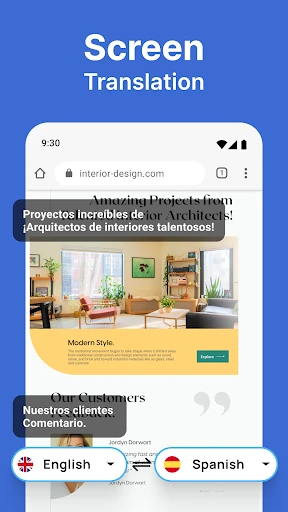
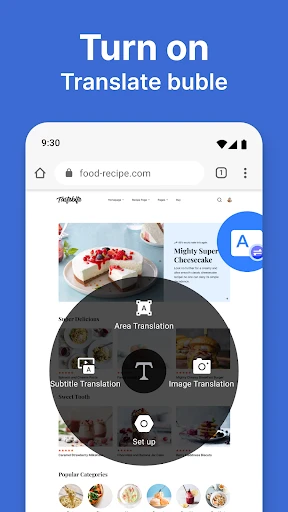
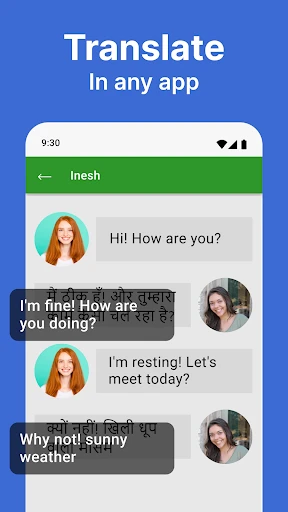
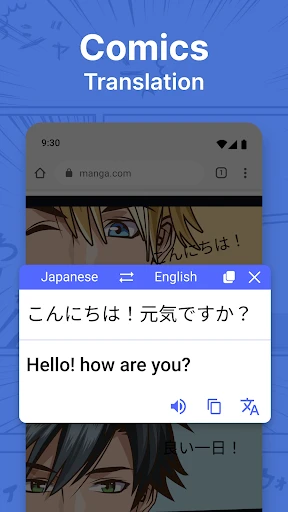
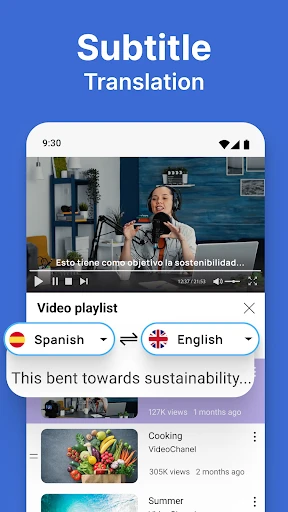
Your Pocket Translator: Effortlessly Breaking Down Language Barriers
Have you ever faced a foreign menu or street sign and felt completely adrift? This app is your solution. The Screen and Photo Translator acts as a personal translation superhero, residing in your pocket and capable of deciphering text across over 100 languages. A vital tool for the frequent traveler and the curious explorer alike, it is designed to become an indispensable part of your digital toolkit.
Demolishing Language Barriers Instantly
Imagine simply pointing your camera at text and seeing it transform into your language in real time. This is the core power of Screen and Photo Translator. Its live translation feature provides immediate understanding of text from images, screenshots, or directly through your camera viewfinder. This capability is invaluable for navigating unfamiliar environments, allowing you to instantly read signs, menus, or documents in a foreign tongue. With extensive language support, you are equipped for virtually any corner of the globe.
An Intuitively Simple Interface
The app's standout quality is its exceptional ease of use. From the moment you launch it, navigation is intuitive and straightforward. It eliminates complex settings and confusing menus. The process is seamless: capture a new photo or select an existing image from your gallery, and the application handles the rest. Results are presented in a clear, side-by-side format, making comparisons between the original and translated text effortless.
Practical Features and Seamless Integration
Beyond core translation, the app includes several practical enhancements. You can easily share translations with friends or save them for future reference—ideal for language study or trip planning. The addition of voice translation introduces further convenience, especially for on-the-go communication. Simply speak into your device, and the app delivers a spoken or textual translation, effectively providing a personal interpreter in your pocket.
Performance and Reliability You Can Trust
This application excels in performance, delivering translations that are both swift and accurate, minimizing wait time. It has proven dependable in diverse real-world scenarios, from deciphering a Parisian bistro menu to understanding a Tokyo metro map. The developers have prioritized a smooth, glitch-free experience, ensuring the app performs reliably whenever you need it most.
In summary, the Screen and Photo Translator is an essential application for anyone navigating multilingual environments. It combines user-friendly design with powerful, versatile functionality. Whether for travel, education, or daily curiosity, this app provides a seamless solution to overcome language obstacles. Download it today and transform your interactions with the world, making every adventure more accessible and engaging.
Pros
- • Accurate text recognition
- • Supports multiple languages
- • Easy to use interface
- • Offline translation available
- • Quick processing time
Cons
- • Limited daily translations
- • Ads can be intrusive
- • Requires camera permissions
- • Some languages have errors
- • Limited free features
Frequently Asked Questions
Q: What is Screen and Photo Translator and how does it work?
A: Screen and Photo Translator is an innovative app designed to translate text captured in photos or screenshots into your preferred language. By utilizing advanced OCR (Optical Character Recognition) technology, it extracts text from images and provides accurate translations. This app is particularly useful for travelers, students, or anyone dealing with foreign languages in daily life. Simply take a picture or select one from your gallery, and let the app do the rest.
Q: What languages does Screen and Photo Translator support?
A: Screen and Photo Translator supports a wide range of languages, making it a versatile tool for global users. It covers major languages including English, Spanish, French, German, Chinese, Japanese, and many more. The app is continually updated to include more languages, ensuring that users can find translations for nearly any language they encounter. Check the app’s language settings to see the current list of supported languages.
Q: Is an internet connection required to use Screen and Photo Translator?
A: Yes, an internet connection is required for Screen and Photo Translator to function effectively. The app relies on online servers to process images and provide accurate translations. While some basic features might work offline, for the best experience and most accurate translations, it’s recommended to have a stable internet connection. This ensures that you can access the latest language data and translation algorithms.
Q: How accurate are the translations provided by Screen and Photo Translator?
A: The accuracy of translations in Screen and Photo Translator depends on several factors including the clarity of the text in the image and the language pair being translated. Generally, the app provides high-quality translations suitable for everyday use. However, for complex documents or specialized language, it might not be perfect. Users are encouraged to double-check critical translations, especially in professional or legal contexts.
Q: Are there any privacy concerns when using Screen and Photo Translator?
A: Screen and Photo Translator takes user privacy seriously. Images processed by the app are not stored on servers after translation is complete, ensuring that your data remains confidential. However, users should be aware that, because the app requires an internet connection to function, some data is transmitted online. Checking the app’s privacy policy can provide more information on how your data is handled and protected.
Information
Similar Apps

Sivi AI Learn English Speaking
Education

Learn Fast & Speak Fluently
Education
Screen and Photo Translator
Education

PlantIn Plant Identifier, Care
Education

Mathway: Scan & Solve Problems
Education

Procare: Childcare App
Education

Reading Eggs - Learn to Read
Education

PLAY-DOH Create ABCs
Education






