The Roku App (Official)
Control Roku Stream Live TV.
Rating
4.7
Installs
50,000,000+
Price
Free
Screenshots


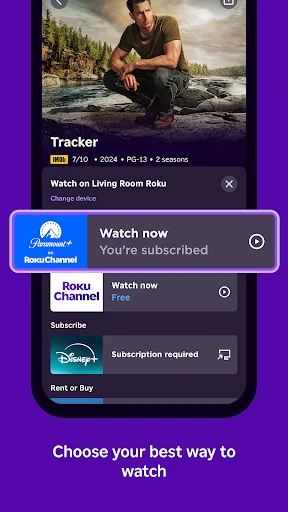


Elevate Your Streaming with the Official Roku App
Simple Setup for Instant Control
Begin by downloading the official Roku app from your smartphone's app store. After installation, the app will seamlessly detect your Roku device on the same Wi-Fi network. Instantly transform your phone into a convenient remote, eliminating the need to search for the physical one.
Innovative Features for Enhanced Viewing
Utilize hands-free voice commands by tapping the microphone to search, play, or control playback. For personal audio, engage private listening by connecting headphones to your phone, enabling immersive sound without disturbing others—ideal for nighttime entertainment.
Intuitive and Familiar Navigation
Navigate your Roku interface using intuitive touch gestures like swipes and taps. The app replicates all essential remote controls while introducing your phone's keyboard for significantly faster and easier text entry.
Additional Tools for a Richer Experience
The app extends beyond a remote, allowing you to cast photos, videos, and music from your phone to your TV. Effortlessly curate your channel lineup and discover new content through the "What's On" section, which highlights popular and recommended programming.
Maximizing Your Roku Experience
In summary, the official Roku app is a versatile enhancement to your entertainment system. It merges essential remote functions with advanced features like voice control and content casting. This integration creates a more streamlined, personalized, and enjoyable way to access all your favorite streaming content.
Pros
- • Seamless integration with Roku devices.
- • User-friendly interface for easy navigation.
- • Supports voice commands for quick searches.
- • Allows private listening via headphones.
- • Free to download and use without ads.
Cons
- • Limited functionality without Roku device.
- • Occasional connectivity issues reported.
- • No offline viewing option available.
- • Requires stable internet for optimal use.
- • In-app purchases for premium features.
Frequently Asked Questions
Q: What is The Roku App (Official) and how does it enhance my Roku streaming experience?
A: The Roku App (Official) is a mobile application designed to complement your Roku streaming device. It allows you to control your Roku player or Roku TV from your smartphone or tablet. With features like voice search, private listening with headphones, and the ability to cast content from your device to your TV, the app enhances your streaming experience by providing easy navigation and additional functionalities.
Q: Is The Roku App (Official) free to download and use?
A: Yes, The Roku App (Official) is free to download from both the Google Play Store and the Apple App Store. While the app itself is free, keep in mind that streaming certain content may require subscriptions or purchases, depending on the channel or service you are accessing through your Roku device.
Q: Can I use The Roku App (Official) to stream content directly from my mobile device to my TV?
A: Yes, The Roku App (Official) includes a feature known as "Play on Roku," which allows you to stream photos, videos, and music directly from your smartphone or tablet to your TV. This feature is particularly useful for sharing personal media with friends and family on a larger screen.
Q: How does the private listening feature work on The Roku App (Official)?
A: The private listening feature on The Roku App (Official) allows users to listen to TV audio through their headphones connected to their mobile device. This feature is ideal for situations where you want to enjoy your content without disturbing others. Simply connect your headphones to your smartphone or tablet, and activate private listening within the app for an immersive audio experience.
Q: What devices are compatible with The Roku App (Official)?
A: The Roku App (Official) is compatible with most iOS and Android devices, including smartphones and tablets. To ensure optimal performance, your device should be running iOS 11.0 or later or Android 5.0 or later. Additionally, the app works with all Roku players and Roku TV models, providing a seamless experience across different devices.
Information
Similar Apps

Ghost Detector Real Life Radar
Entertainment

The Roku Channel
Entertainment

Philo: Shows, Movies, Live TV.
Entertainment

1 Peso
Entertainment

Christmas Globe
Entertainment

HBO Go
Entertainment

Trending Prank Call & Chat
Entertainment
Spin Wheel: Random Selection
Entertainment






