
PlayStation App
PlayStation App Connect With Friends Games News.
Rating
3.6
Installs
100,000,000+
Price
Free
Screenshots
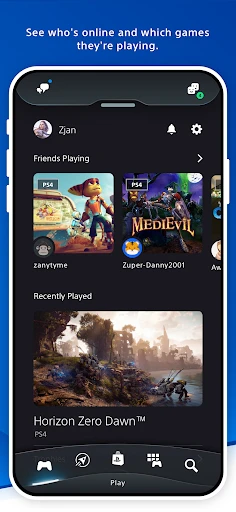
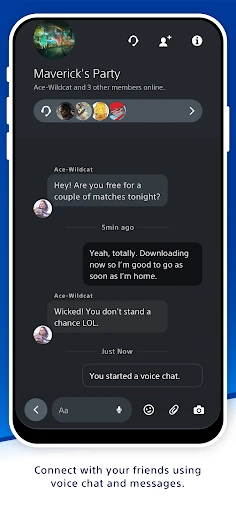
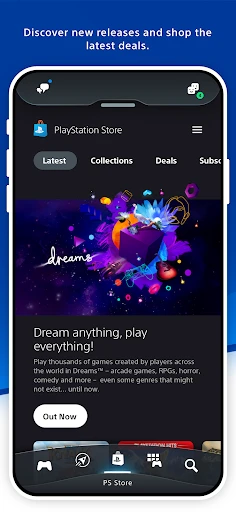
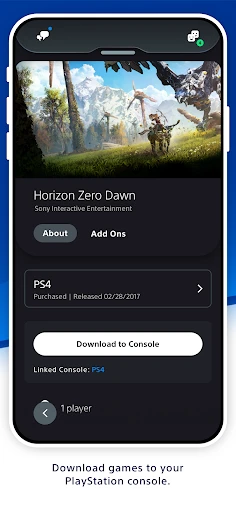
Your PlayStation Companion: The Essential PlayStation App
For every PlayStation enthusiast, the PlayStation App transforms your smartphone into a powerful extension of your console. Imagine carrying the essence of your PlayStation wherever you go, from your daily commute to your living room couch. Intrigued? Discover how this app can fundamentally enhance your entire PlayStation experience.
Intuitive Design, Instant Access
From the first launch, the PlayStation App greets you with a sleek, user-friendly interface. The home screen presents a welcoming and organized gateway, effectively creating your personal gaming command center.
Clear menus and intuitive icons put every function within easy reach. Browse the latest releases, manage your downloads, or message friends—all accomplished with just a few taps. The design ensures seamless navigation for gamers of all technical backgrounds.
Stay Connected to Your Community
The app excels at keeping you engaged with your friends' gaming journeys. Celebrate when they unlock a new trophy or join a multiplayer invite directly from your device. Integrated voice chat means your squad stays connected, fostering that togetherness no matter the physical distance.
Timely notifications are indispensable. Receive immediate alerts for friend requests, store promotions, and upcoming gaming events. It acts as your dedicated gaming concierge, ensuring you're always informed and never miss a beat.
Play Your Console Games Anywhere
Remote Play is the app's standout feature, allowing you to stream your PlayStation library directly to your mobile device. Found yourself away from your television? Your gaming progress doesn't have to pause.
Setup is straightforward, and once configured, it provides a remarkably responsive portable console experience. With a stable connection and minimal input lag, it's a genuine solution for gaming beyond the living room.
Personalized for Your Play Style
The PlayStation App shines by tailoring itself to you. It recommends titles based on your play history and curates a news feed focused on your interests, creating a distinct feeling that the app genuinely understands you as a gamer.
Further customize your public profile and showcase your trophy collection. These personal touches allow you to shape your identity within the PlayStation network, making the experience uniquely yours.
The Verdict
In today's connected world, the PlayStation App is an indispensable tool. It's essential for any PlayStation owner looking to deepen their engagement. From managing your library and social connections to enabling gameplay anywhere, this app delivers a comprehensive suite of features. Download it today and elevate every aspect of your PlayStation life.
Pros
- • Seamless integration with PlayStation console.
- • Real-time notifications and updates.
- • Remote game downloads and installations.
- • Access to PlayStation Store offers.
- • Social connectivity with friends.
Cons
- • Requires constant internet connection.
- • Occasional lag in app performance.
- • Limited features compared to console.
- • Large storage space required.
- • In-app purchases can be costly.
Frequently Asked Questions
Q: What features does the PlayStation App offer?
A: The PlayStation App provides a range of features for PlayStation users. It allows you to connect with friends, receive notifications, game alerts, and invitations, and use your mobile device as a second screen in supported games. Additionally, you can browse the PlayStation Store, download games remotely, and manage your console settings directly from the app.
Q: Is the PlayStation App available for both Android and iOS?
A: Yes, the PlayStation App is available for download on both Android and iOS devices. You can find it on the Google Play Store for Android devices and the Apple App Store for iOS devices. Ensure your device is compatible with the app by checking the system requirements on the respective store page.
Q: Can I use the PlayStation App to chat with friends?
A: Absolutely, the PlayStation App allows you to chat with your PlayStation Network friends. You can send and receive text messages and voice chat directly through the app. This feature makes it easy to stay connected with your gaming community, even when you are away from your console.
Q: Does the PlayStation App support remote game downloads?
A: Yes, one of the convenient features of the PlayStation App is the ability to initiate game downloads remotely. This means you can purchase and download games from the PlayStation Store and have them ready to play when you get home. Make sure your console is set to stay connected to the internet in Rest Mode to use this feature.
Q: How secure is the PlayStation App?
A: Security is a priority for the PlayStation App. It uses encryption to protect your personal information and login credentials. Additionally, you can enable two-step verification on your PlayStation Network account for added security. It's recommended to regularly update the app to benefit from the latest security enhancements.
Information
Similar Apps

Antistress Relax Relief Games
Entertainment

MoneyTime - Play & Earn
Entertainment

Kids Bowl Free
Entertainment

Color Pop - Fun Coloring Games
Entertainment
Spin the Wheel: Random Picker+
Entertainment

Japevox - Funny Prank Sound
Entertainment

ViX: TV, Deportes y Noticias
Entertainment

Tarot!
Entertainment






