
Canvas Student
Canvas Student App For School Course Management.
Rating
4.7
Installs
10,000,000+
Price
Free
Screenshots

Essential Guide to the Canvas Student App
Students and lifelong learners, welcome. Managing coursework, deadlines, and academic communication is a complex task. The Canvas Student app transforms this complexity into clarity, becoming an indispensable partner in your educational journey. Discover how this tool can streamline your academic life.
Initial Impressions and Interface
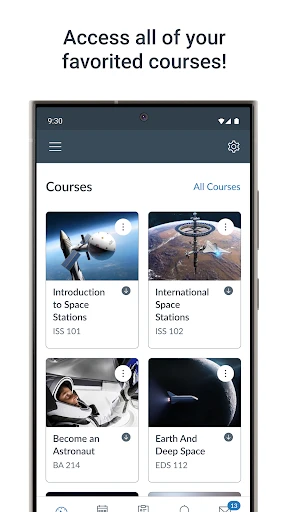
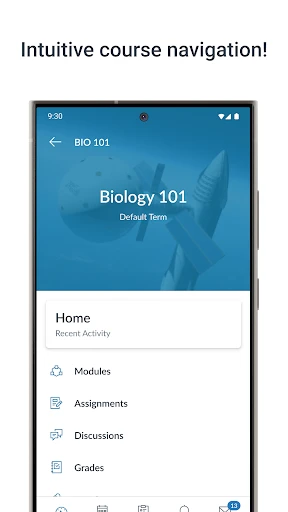
Upon downloading the Canvas Student app—available for iOS and Android—you are greeted by an intuitive and organized interface. It functions less as a simple application and more as a mobile command center for your education. After login, your dashboard presents all enrolled courses at a glance, eliminating the need to search through folders for essential materials like syllabi or project guidelines.
Core Features for Academic Success
A defining strength of Canvas Student is its streamlined assignment submission. Imagine finalizing a project away from your desk, with the deadline approaching. The app allows you to upload work directly from your device, supporting a wide range of file formats for maximum flexibility.
The Grades section provides immediate, transparent insight into your academic performance. Beyond viewing scores, the integrated "what-if" grade calculator lets you project the impact of upcoming work, offering strategic guidance for your study planning.
Seamless Communication and Collaboration
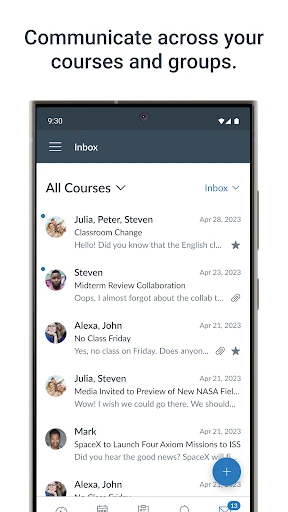
Effective learning relies on connection, and Canvas Student facilitates this through integrated discussion boards and direct messaging. Engage in course conversations, clarify concepts with instructors, and receive feedback from anywhere. Customizable notification settings ensure you never miss an important update or announcement.
Universal Accessibility and Reliability
Canvas Student is built for inclusivity and ease of use. Its straightforward design ensures navigability for users of all technical skill levels. Key functions are accessible within taps, and the app maintains consistent performance across phones and tablets, providing a stable and frustration-free experience.
Final Assessment
In summary, the Canvas Student app serves as a reliable and powerful academic companion. It effectively centralizes and simplifies course management, allowing you to dedicate more focus to learning itself. From submitting work to tracking progress and collaborating, it ensures you remain organized and connected.
To enhance your study efficiency and gain control over your academic responsibilities, consider downloading Canvas Student. Its integration into your routine will quickly reveal its value as an essential educational tool.
Pros
- • User-friendly interface for easy navigation.
- • Real-time notifications for updates.
- • Offline mode for accessing materials.
- • Integrates with various educational tools.
- • Supports multimedia submissions.
Cons
- • Requires internet for full functionality.
- • Limited customization options.
- • Occasional sync issues reported.
- • Some features require in-app purchases.
- • Can drain battery quickly on older devices.
Frequently Asked Questions
Q: What is Canvas Student and who is it for?
A: Canvas Student is a mobile application designed for students to access their courses and educational materials on the go. It is specifically developed for students using the Canvas Learning Management System (LMS). This app is highly beneficial for students who wish to stay updated with their coursework, assignments, grades, and communication with instructors and peers.
Q: How can I submit assignments using Canvas Student?
A: Canvas Student allows you to submit assignments directly from your mobile device. To submit an assignment, navigate to the 'Assignments' section of the course, select the assignment you wish to submit, and follow the prompted steps. You can upload files, images, or even record audio and video submissions, making it easy to submit work from anywhere.
Q: What features does Canvas Student offer for communication?
A: Canvas Student offers several communication features to enhance interaction between students and instructors. Users can send and receive messages through the 'Inbox' feature, participate in course discussions, and receive push notifications for important updates. These tools ensure that communication is seamless and timely, keeping students connected with their academic community.
Q: Is Canvas Student available for both Android and iOS devices?
A: Yes, Canvas Student is available for both Android and iOS devices. You can download the app from the Google Play Store for Android devices and the Apple App Store for iOS devices. The app is designed to function smoothly on both platforms, providing a consistent user experience regardless of the device you use.
Q: Are there any costs associated with using Canvas Student?
A: Canvas Student is a free application for both Android and iOS users. However, your institution must have an active subscription to the Canvas LMS for you to access and use the app. While the app itself is free, any additional costs would be determined by your institution's subscription and usage policies, not by the app.
Information
Tags
Similar Apps

Scientific calculator plus 991
Education

Super Teacher
Education

Talkpal - AI Language Learning
Education

Kahoot! Play & Create Quizzes
Education

CDL Prep
Education

HelloTalk - Learn Languages
Education

Symbolab: AI Math Solver
Education

PDG PROmote 2023-2025
Education






