
Minecraft Education
Engage Students In Creative Learning Through Playful Coding.
Rating
4.0
Installs
10,000,000+
Price
Free
Screenshots

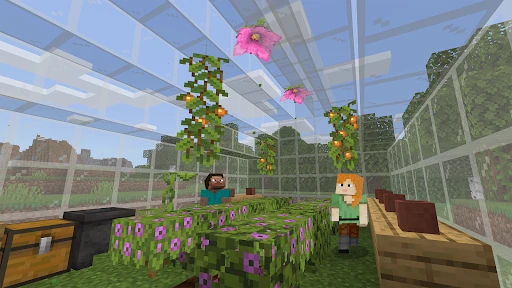


Exploring Minecraft Education: A Fusion of Learning and Play
For anyone intrigued by the blend of adventure, creativity, and education, Minecraft Education stands out as a captivating application. I admit to initial skepticism—transforming a globally popular sandbox game into a structured learning resource seemed ambitious. However, my assumptions were quickly proven entirely wrong.
Getting Started with Minecraft Education
Beginning your journey is straightforward. The app is readily available for download on iOS and Android via the Apple App Store and Google Play Store. Following installation, a simple login with your school credentials grants you access to a universe where educational content and engaging gameplay seamlessly merge.
The interface is designed for universal accessibility. Even those less comfortable with digital tools can navigate the options with ease. Upon launching, a diverse array of prepared lesson plans and immersive worlds immediately invites exploration.
The Convergence of Classroom and Creative World
The core strength of Minecraft Education lies in its transformation of academic subjects into interactive experiences. From history and mathematics to computer science, the platform integrates educational tools directly into the environment. I found myself particularly engrossed by the chemistry features, which allow you to construct and experiment within a virtual lab.
Collaborative features further enhance the experience, enabling students to work together on builds and projects as they would in a physical classroom. This fosters a spirit of shared discovery, creativity, and problem-solving, opening a world of limitless potential for understanding and innovation.
Engaging Challenges That Reinforce Knowledge
A compelling experience requires engaging objectives, and Minecraft Education excels here. Alongside curriculum content, the app offers a wealth of quests and challenges designed for enjoyment. I became absorbed in a puzzle-based treasure hunt that required applying lesson-based knowledge, proving that educational review can be genuinely thrilling.
These activities are crafted to solidify learning objectives, ensuring that as you play and have fun, you are also absorbing and retaining new information. This synergy between engagement and education represents a perfect balance.
Final Impressions on Minecraft Education
In conclusion, Minecraft Education is an application that masterfully unites the engaging elements of a game with substantive educational value. It is an ideal resource for students seeking dynamic learning and for educators aiming to inject interactive energy into their teaching.
If you are considering whether to explore it, I strongly encourage you to begin. Whether you are a student, teacher, or lifelong learner, Minecraft Education provides a unique and rewarding experience. Dive in and witness your knowledge and creativity expand—one block at a time.
Pros
- • Engages students with interactive learning.
- • Supports creative problem-solving skills.
- • Promotes collaboration among peers.
- • Offers a vast library of educational content.
- • Cross-platform compatibility enhances accessibility.
Cons
- • Requires a stable internet connection.
- • Limited free features in basic version.
- • Steep learning curve for beginners.
- • Some devices may experience lag.
- • Subscription costs can be high for schools.
Frequently Asked Questions
Q: What is Minecraft Education Edition?
A: Minecraft Education Edition is a version of the popular sandbox game Minecraft, specifically designed for educational purposes. It allows teachers and students to use the game's creative and interactive elements to engage with subjects like math, science, history, and art. The game includes special features like classroom management tools and lesson plans to facilitate learning.
Q: How can Minecraft Education Edition be used in the classroom?
A: Minecraft Education Edition can be used in the classroom to enhance learning by providing immersive, hands-on experiences. Teachers can use it to create interactive lessons, conduct virtual field trips, and facilitate group projects. The game supports collaboration and encourages creativity, critical thinking, and problem-solving skills among students.
Q: What devices are compatible with Minecraft Education Edition?
A: Minecraft Education Edition is compatible with a variety of devices, including Windows and macOS computers, iPads, and Chromebooks. This ensures flexibility in educational environments, allowing students and teachers to access the game on the devices they are most comfortable with. It's important to check the system requirements to ensure optimal performance.
Q: Is Minecraft Education Edition safe for students to use?
A: Yes, Minecraft Education Edition is designed with student safety in mind. It includes features like a secure login system, in-game chat filters, and the ability to control who can join a game, ensuring a safe and controlled environment for students. Teachers can also monitor gameplay and guide students' activities within the game.
Q: Do I need a special license to use Minecraft Education Edition?
A: Yes, to access Minecraft Education Edition, schools or individuals need to purchase a special license. This license grants users access to the educational features and resources within the game. Pricing varies depending on the number of users and the region, so it's best to check with the official Minecraft Education Edition website for detailed information on licensing options.
Information
Tags
Similar Apps

Pinkfong Baby Shark: Kid Games
Education

PlantIn Plant Identifier, Care
Education

Quiz AI: AI Homework Helper
Education

English to Spanish Translator
Education

Khan Academy Kids
Education

Learn to Read - Duolingo ABC
Education

Calculator
Education

Cursa - Online courses
Education






