
SkyView® Lite
SkyView Lite Explore Stars Planets For All.
Rating
4.4
Installs
10,000,000+
Price
Free
Screenshots

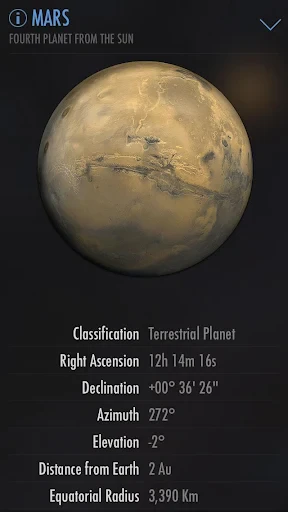


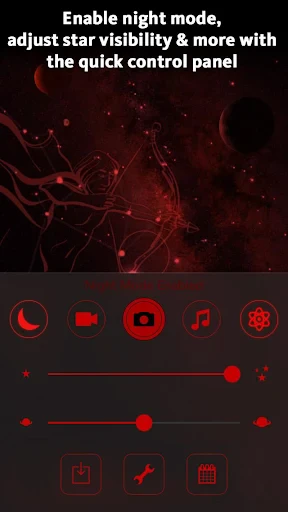
Your Digital Window to the Cosmos
Hello, astronomy enthusiasts! Have you ever gazed at the night sky, curious about the names and stories behind those points of light? Your curiosity is easily satisfied with an app that transforms your mobile device into a personal star guide. Meet SkyView® Lite, a complimentary application designed to delight everyone from novice sky-watchers to experienced observers.
Instant Celestial Navigation
Beginning your exploration with SkyView® Lite is wonderfully straightforward. The application is built for simplicity. Upon launching, it utilizes your device’s camera and sensors to superimpose a map of stars, constellations, planets, and man-made satellites directly onto your live view. The design is user-friendly, allowing for immediate enjoyment. Simply aim your phone at the heavens, and a detailed astronomical chart appears instantly.
Features That Enhance Observation
Let’s explore the tools that make SkyView® Lite so valuable. A standout capability is its time simulation function. With minimal interaction, you can project the sky’s appearance for any date in history or the future. Interested in the planetary arrangement on a significant past date? Easily done. Planning for an upcoming eclipse or meteor shower? The app provides a preview.
Additionally, the app excels at real-time identification. As you sweep your device across the sky, it labels everything from the steady glow of Venus to the swift pass of the International Space Station, delivering key information on demand.
Educational Discovery at Every Tap
For the perpetually curious, SkyView® Lite serves as an engaging learning portal. Selecting any labeled object reveals a summary packed with scientific data and intriguing details. It’s akin to carrying a condensed, interactive encyclopedia of the universe. This feature also makes it an excellent educational resource for children, fostering wonder and a love for science as they explore.
Noting Practical Considerations
It’s important to note that SkyView® Lite’s performance is tied to your hardware. Its precision depends on your device’s GPS, compass, and gyroscope. Occasionally, you might experience minor calibration delays or positional inaccuracies, particularly in locations with weak satellite reception. These are typical limitations of augmented reality technology rather than flaws unique to the app.
Final Verdict
In summary, SkyView® Lite is a brilliant and accessible gateway to astronomy. It serves equally well for formal education, trip planning, or spontaneous celestial curiosity. Given that its core functionality comes at no cost, it represents exceptional value. If the night sky calls to you, installing SkyView® Lite is an effortless decision. Embark on your stellar adventure today.
Pros
- • Intuitive user interface that's easy to navigate.
- • Real-time sky map with accurate star tracking.
- • No need for Wi-Fi to use the app outdoors.
- • Offers educational information about constellations.
- • Simple setup with no need for creating an account.
Cons
- • Limited features compared to the paid version.
- • Contains ads that can disrupt the experience.
- • Night mode can sometimes be too dim.
- • Initial calibration may be slightly off.
- • Battery consumption is fairly high.
Frequently Asked Questions
Q: What is SkyView® Lite and how does it work?
A: SkyView® Lite is an astronomy app that lets users explore stars, constellations, and satellites by simply pointing their device at the sky. Using advanced augmented reality (AR) technology, the app overlays information about celestial objects onto your camera view, making stargazing both educational and entertaining. Ideal for both beginners and enthusiasts, it requires no WiFi or data connection to function.
Q: Is SkyView® Lite free to use, and are there any in-app purchases?
A: SkyView® Lite is free to download and use, offering a basic set of features that are perfect for casual stargazers. However, for users seeking advanced features such as additional celestial objects or enhanced visual experiences, there are optional in-app purchases available. These can enhance your stargazing experience, but the core functionality is completely free.
Q: What devices are compatible with SkyView® Lite?
A: SkyView® Lite is compatible with most iOS and Android devices. For iOS, it requires iOS 12.0 or later, while for Android, it typically requires Android 5.0 and up. The app is optimized to run smoothly on smartphones and tablets, ensuring a seamless user experience across different device types.
Q: Do I need an internet connection to use SkyView® Lite?
A: No, SkyView® Lite does not require an internet connection to function, making it perfect for use in remote areas without WiFi or mobile data. The app uses your device's GPS and compass to accurately display celestial objects, allowing you to explore the night sky anytime, anywhere, without relying on an internet connection.
Q: How accurate is SkyView® Lite in identifying stars and constellations?
A: SkyView® Lite is highly accurate in identifying stars, constellations, and other celestial objects. It uses your device’s GPS and compass to provide real-time data, ensuring that the information displayed is precise. While the app is quite reliable, accuracy can be impacted by environmental factors like magnetic interference or poor GPS signal, so minor discrepancies may occur.
Information
Similar Apps

Toca Hair Salon 3
Education

Luzia: Your AI Assistant
Education

Grammar Check by AI Writing
Education

AI Tutor - Math Homework Help
Education

MasterClass: Become More You
Education

Alison: Online Education App
Education

Zutobi: Permit & Driving Prep
Education

PBS KIDS Video
Education






