
Google Classroom
Google Classroom School Classwork And Communication Hub.
Rating
2.5
Installs
100,000,000+
Price
Free
Screenshots


Your Essential Classroom Companion
For students managing numerous deadlines and a busy academic calendar, Google Classroom emerges as an indispensable ally. Consider it your dedicated academic organizer, a tool that can fundamentally transform your approach to schoolwork.
The Central Command for Learning
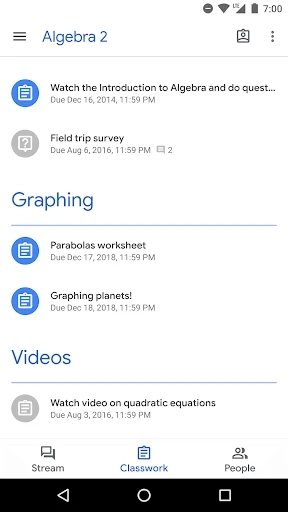
Organization is the core purpose. Google Classroom streamlines class management by consolidating courses, tasks, and instructor feedback into one unified, orderly location. Imagine eliminating the need to sift through crowded inboxes or navigate multiple sites for a single handout. This platform ensures your critical materials are immediately accessible.
Its seamless integration with Google Drive, Docs, and Calendar forms a powerful, cohesive ecosystem. You can effortlessly attach files from Drive, compose work directly in Docs, and monitor deadlines through Calendar. It represents a symphony of productivity.
Communicate and Work Together
This platform extends beyond organization to foster interaction. Instructors can post announcements, facilitate discussions, and provide timely feedback. For you, this translates to consistent clarity—eliminating uncertainty about due dates and enabling quick queries and responses.
Collaborative projects become more manageable. When your entire group is connected within the app, sharing resources, brainstorming, and co-creating is simplified. It functions as a perpetual, digital study session.
Accessible Learning on Your Terms
Google Classroom prioritizes universal access. Whether on a computer, tablet, or smartphone, your classroom is available anywhere, at any time. This flexibility is crucial for today's mobile students. The interface is clean and intuitive, avoiding complex menus that can cause confusion.
It supports diverse learning styles. Teachers can distribute content in various formats—video, image, or text—catering to individual preferences and ensuring all students can engage with the material effectively.
Final Thoughts
Within the landscape of educational technology, Google Classroom stands out as a reliable, efficient, and user-friendly solution. It is not merely an application but a comprehensive resource that enhances the entire educational experience. For students seeking control over their workload or educators desiring deeper class engagement, this platform is a compelling choice.
As digital learning becomes ever more prevalent, a tool like Google Classroom, designed to actively support and enrich that experience, is vital. If you have not yet explored it, consider giving it a try. It may very well pave a smoother path through your academic journey.
Pros
- • User-friendly interface for easy navigation
- • Integrates well with other Google services
- • Facilitates communication between teachers and students
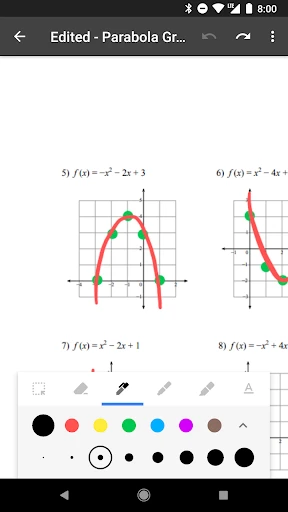
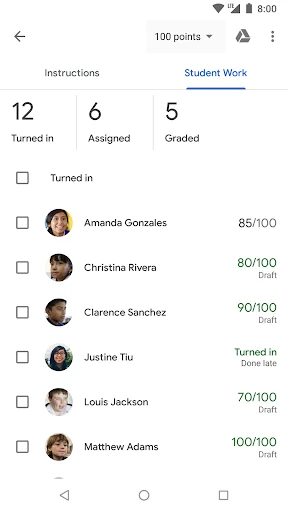
- • Supports assignment tracking and grading
- • Free to use for schools and personal use
Cons
- • Limited customization options for teachers
- • Requires internet connection to access
- • Notifications can be overwhelming
- • Lacks some advanced features for grading
- • Depends heavily on Google ecosystem
Frequently Asked Questions
Q: What is Google Classroom and how does it work?
A: Google Classroom is an online platform developed by Google to simplify creating, distributing, and grading assignments in a paperless way. It integrates with other Google services like Google Docs, Drive, and Gmail, allowing teachers to create classes, distribute assignments, communicate, and stay organized in a virtual environment. Students can join classes, access materials, submit assignments, and receive feedback. This tool is widely used in educational institutions to facilitate learning and collaboration.
Q: Is Google Classroom free to use?
A: Yes, Google Classroom is free for schools and anyone with a personal Google account. Educational institutions can access it as part of Google's G Suite for Education, which offers additional tools and features to enhance the learning experience. However, some schools may have additional costs if they use premium services or devices that integrate with Google Classroom.
Q: Can Google Classroom be used on mobile devices?
A: Absolutely! Google Classroom is available as a mobile application for both Android and iOS devices. This allows students and teachers to access their classes, assignments, and resources on-the-go. The mobile app includes most of the features available on the desktop version, providing flexibility and convenience for users to manage their educational tasks from anywhere.
Q: How secure is Google Classroom for students and teachers?
A: Google Classroom is designed with robust security and privacy measures to protect user data. It complies with global educational privacy standards, including FERPA in the United States. User information is encrypted, and Google does not use personal information for advertising purposes. Schools and individuals have control over their data, and Google provides tools to manage permissions and security settings effectively.
Q: What kind of support is available for Google Classroom users?
A: Google offers extensive support for Google Classroom users, including a Help Center with guides and tutorials, community forums for peer support, and direct customer service for more technical inquiries. Educational institutions using G Suite for Education often have dedicated support channels to assist teachers and administrators in effectively using the platform. Additionally, there are numerous online resources, including video tutorials and courses, to help users navigate and maximize the platform's capabilities.
Information
Similar Apps

Prepware Remote Pilot
Education

Kiddopia - Kids Learning Games
Education

LEGO® DUPLO® Marvel
Education

Mathway: Scan & Solve Problems
Education

PROmote - Army Study Guide
Education

Photomath
Education

Plant App - Plant Identifier
Education

Psychological Assessment Test
Education






