EasyTether Pro
EasyTether Pro Share Internet No Root Needed.
Rating
4.1
Installs
100,000+
Price
$9.99
Screenshots
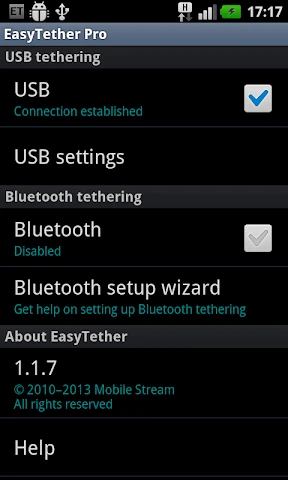
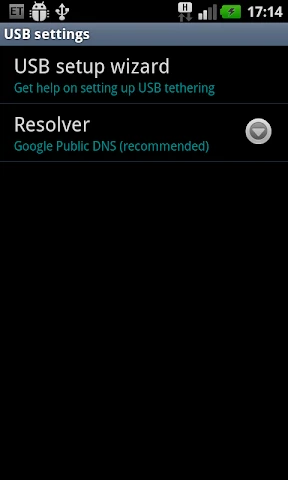
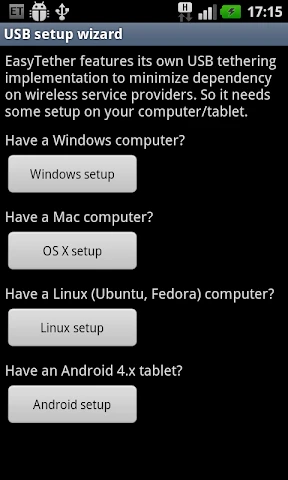
My Assessment of EasyTether Pro
Initial Setup Process
Setting up EasyTether Pro proved surprisingly straightforward. Even with a moderate technical skill level, the app provided clear guidance. The requirements were minimal: a USB cable, my smartphone, and my computer. Following the in-app driver links for installation led to a quick and ready state. Its broad compatibility with Windows, Mac, Linux, and various game consoles was immediately apparent.
The Simplicity of Connection
The core strength of EasyTether Pro is its effortless operation. Post-configuration, establishing an internet connection for my computer became trivial. Launching the app and connecting my phone via USB instantly provided my laptop with cellular data. This functionality proved invaluable during unexpected home internet outages.
Performance speeds were consistently adequate. While dependent on cellular signal and data allowance, activities like video streaming and web browsing remained fluid. I experienced no significant latency or stability issues, which was a positive outcome.
Device Support and Reliability
I was further impressed by its seamless cross-platform performance. Switching between Windows PCs and MacBooks presented no challenges, and even setup on a Linux system was equally hassle-free. Support for gaming consoles like Xbox and PlayStation is noted, though I did not personally verify this feature.
Regarding reliability, EasyTether Pro maintained a stable and persistent connection throughout my usage without unexpected drops. A notable consideration is accelerated battery consumption on the phone, making it advisable to tether while connected to a power source.
Overall Conclusion
In summary, EasyTether Pro is a robust solution for utilizing your phone as a network modem. It combines intuitive design with consistent performance and extensive device compatibility. While it is a paid application, the convenience it offers justifies the cost for users with frequent need for alternative internet access.
For anyone regularly encountering Wi-Fi dead zones, EasyTether Pro serves as an exceptionally useful tool. Based on my experience, it comes as a highly recommended utility.
Pros
- • Stable tethering connection
- • No root access needed
- • Supports multiple devices
- • Compatible with major carriers
- • Easy to set up
Cons
- • Paid app
- • Limited customer support
- • No iOS version available
- • Requires initial configuration
- • Consumes battery quickly
Frequently Asked Questions
Q: What is EasyTether Pro and how does it work?
A: EasyTether Pro is an application that allows you to share your smartphone's internet connection with your computer or tablet via USB or Bluetooth tethering. It works by creating a secure connection between your devices, enabling internet access on your secondary device without needing a separate data plan.
Q: Is EasyTether Pro compatible with all smartphones and computers?
A: EasyTether Pro is compatible with most Android smartphones and supports Windows, macOS, and Linux operating systems. However, it is always recommended to check the specific compatibility with your device model and operating system version to ensure seamless functionality.
Q: Does EasyTether Pro require root access to function?
A: No, EasyTether Pro does not require root access to function. It is designed to work on non-rooted devices, making it accessible to a broader range of users who may not want to modify their device's operating system.
Q: Are there any data usage limitations with EasyTether Pro?
A: While EasyTether Pro itself does not impose data usage limits, your mobile carrier may have restrictions or charges for tethering. It's important to review your carrier's policy on data sharing to avoid any unexpected fees or throttling of your internet speed.
Q: How do I install and set up EasyTether Pro on my devices?
A: To install EasyTether Pro, download the app from the Google Play Store on your Android device. Then, follow the on-screen instructions to connect your phone to your computer via USB or Bluetooth. Additional setup may be required on your computer, such as installing drivers or configuration software, which are available on the EasyTether website.
Information
Similar Apps

Email for Outlook, Hotmail
Communication

RSA Authenticator (SecurID)
Communication

Messages - SMS, Chat Messaging
Communication

Samsung Accessory Service
Communication

LINE: Calls & Messages
Communication

Messages: SMS Messaging
Communication

Video Call
Communication

VirtuNum - Virtual Number
Communication






