
Email - Fast and Smart Mail
Smart Secure Email For Busy Professionals.
Rating
4.2
Installs
10,000,000+
Price
Free
Screenshots


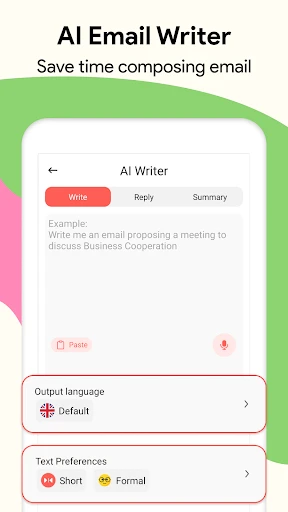

Email - Fast and Smart Mail: A Comprehensive Overview
An Intuitive and Visually Appealing Design
Email - Fast and Smart Mail presents a modern, clean interface that makes managing multiple accounts surprisingly straightforward. For anyone juggling various inboxes and seeking to reclaim control over their email flow, this application offers a compelling and efficient solution. Here’s an exploration of its standout characteristics in the competitive email client market.
Exceptional Speed and Seamless Performance
The application’s name is a direct reflection of its core strength: remarkable swiftness. Messages load instantly, and composing responses is a lag-free experience. It excels at managing multiple email accounts concurrently, ensuring that switching between professional, personal, and other mailboxes remains fluid and highly responsive without any clutter.
Intelligent Features for Enhanced Productivity
The app truly distinguishes itself through a suite of automated, smart tools designed to streamline email management. It proactively categorizes your correspondence, prioritizing important messages and filtering out noise. Its robust search functionality can locate specific emails from deep within your archive effortlessly. Additionally, its intelligent notification system is engineered to keep you informed without creating distraction.
Robust Security and Privacy Protections
Prioritizing user security in an era of digital vulnerability, Email - Fast and Smart Mail incorporates strong safeguards. It employs encryption for data protection and supports two-factor authentication, providing substantial peace of mind that your communications and information remain confidential and secure.
Extensive Customization and Personalization
Beyond its core functionality, the application offers deep personalization options. Users can tailor the visual theme, define custom swipe actions, and configure folder structures to match their workflow. This high degree of adaptability ensures the app can be molded to fit individual preferences and habits perfectly.
Minor Considerations and Quirks
While the app performs admirably across most functions, it is not without slight imperfections. On occasion, its notification system can be persistent, potentially alerting you to emails already addressed. This is a minor point, but one that users who prefer minimal alerts may want to note.
Final Impressions and Conclusion
In summary, Email - Fast and Smart Mail delivers a potent combination of speed, intelligent automation, and strong organization. It is a formidable tool for both heavy email users and those simply seeking a more reliable and streamlined messaging experience. Giving this application a trial run may very well transform your approach to email management permanently.
Pros
- • User-friendly interface
- • Supports multiple accounts
- • Efficient spam filter
- • Fast email syncing
- • Customizable notifications
Cons
- • Limited storage options
- • Occasional ads in free version
- • No offline mode
- • Lacks advanced search filters
- • Basic design lacks flair
Frequently Asked Questions
Q: What features does the Email - Fast and Smart Mail app offer?
A: The Email - Fast and Smart Mail app provides a range of features designed to enhance your email experience. It supports multiple email accounts, allowing you to manage all your emails in one place. The app also offers customizable push notifications, a smart inbox that prioritizes important messages, and an intuitive interface for ease of use. Additionally, users can benefit from advanced search options, email scheduling, and robust security features to protect your data.
Q: Is the Email - Fast and Smart Mail app secure to use?
A: Yes, the Email - Fast and Smart Mail app prioritizes user security by implementing several measures to protect your information. It uses encryption protocols to safeguard your emails and personal data from unauthorized access. Additionally, the app supports two-factor authentication for an extra layer of security. Regular updates ensure that the app remains secure against emerging threats. Users can confidently manage their emails knowing that their data is protected.
Q: How do I set up multiple email accounts in the app?
A: Setting up multiple email accounts in the Email - Fast and Smart Mail app is straightforward. After installing the app, navigate to the settings menu and select 'Add Account'. You can then enter your email credentials for each account you wish to add. The app supports various email providers, including Gmail, Yahoo, and Outlook, ensuring flexibility and convenience. Once added, you can easily switch between accounts and manage all your emails seamlessly from one app.
Q: Can I customize notifications in the Email - Fast and Smart Mail app?
A: Absolutely! The Email - Fast and Smart Mail app allows users to customize notifications to suit their preferences. You can choose which email accounts to receive notifications from and set specific alert tones for different contacts or types of emails. Additionally, the app provides options to enable or disable notifications during certain hours, ensuring that you receive alerts at times that are convenient for you. This level of customization ensures that you stay informed without being overwhelmed.
Q: Does the Email - Fast and Smart Mail app support offline access?
A: Yes, the Email - Fast and Smart Mail app does support offline access. This feature allows you to read and write emails even when you are not connected to the internet. Your drafts will be saved locally and sent once you regain connectivity. This is particularly useful for users who travel frequently or have intermittent internet access, ensuring that you can manage your emails at any time, regardless of your connection status.
Information
Similar Apps

Messages - Text SMS App
Communication
Email - Fast and Smart Mail
Communication

Messages : SMS & Private Chat
Communication

2nd Line+ Phone Number & eSIM
Communication

GizmoHub
Communication

HomeWAV
Communication

Vivaldi Browser - Fast & Safe
Communication

Samsung Internet Browser
Communication






