
GroupMe
Group Chat For Everyone Friends Family Teams.
Rating
4.6
Installs
10,000,000+
Price
Free
Screenshots


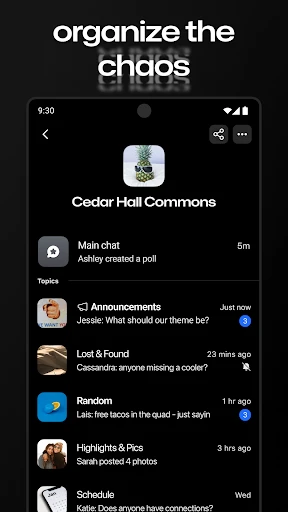

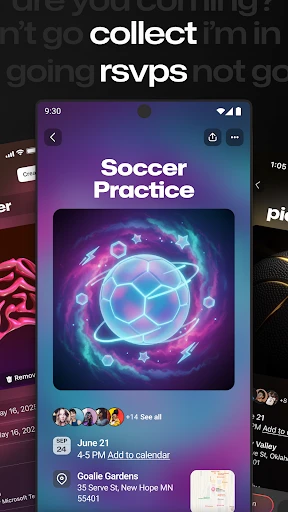
GroupMe: The Essential App for Seamless Group Communication
Tired of juggling multiple apps to manage all your different group conversations? Meet GroupMe, the solution designed to consolidate your group messaging into one simple, efficient hub. Once you start using it, you’ll question how you ever coordinated without it.
Simple and Quick Setup Process
Getting started is effortless. The app is available for both Android and iOS, with an installation process that takes just moments. Upon launching, you’re met with a clean, user-friendly interface. Registration is flexible—sign up with your email or seamlessly use your existing Microsoft account.
Key Features and Functionality
GroupMe excels by combining straightforward design with powerful tools. Create groups for any event, from family reunions to project teams, with ease. Inviting people is simple: send a link, or add contacts by phone number or email. It’s so intuitive that everyone can join, regardless of their tech comfort level.
A standout feature is the built-in meme maker. Now you can create and share memes instantly without ever leaving the app. Add text to any photo and spread the laughter. GroupMe also integrates GIF support and maintains a shared gallery for all the media your group exchanges.
Organization and Enhanced Communication
The app helps you maintain control and order. Mute busy groups when you need quiet, and revisit them later without missing a beat. Your entire chat history is preserved, ensuring you stay informed on all plans and shared moments.
When messages aren’t enough, use the integrated conference call feature. It’s ideal for impromptu meetings or voice chats with friends, eliminating the need for lengthy typed conversations. Just hit the call button to connect instantly.
Final Summary
In today’s connected world, GroupMe acts as your dependable hub for group interaction. From planning events to everyday chatting, this app delivers free, intuitive, and feature-rich communication. It’s poised to become an indispensable tool on your device.
Ready to simplify your group coordination? Give GroupMe a try and experience how effortlessly it keeps your circles connected and organized. You might just become the master planner your friends rely on.
Pros
- • User-friendly interface and easy navigation.
- • Integrates smoothly with Microsoft Office.
- • Free to use with no hidden costs.
- • Supports custom emojis and GIFs.
- • Allows group messaging without sharing numbers.
Cons
- • Limited file sharing capabilities.
- • Lacks advanced privacy settings.
- • No end-to-end encryption available.
- • Desktop app needs improvement.
- • Ads may disrupt user experience.
Frequently Asked Questions
Q: What is GroupMe and how does it work?
A: GroupMe is a free group messaging app that lets users create groups for family, friends, or work teams. It works by allowing users to send and receive messages within the app or via SMS, making it accessible even without an internet connection. Users can also share photos, videos, and links, making it a versatile tool for staying connected.
Q: Is GroupMe available on all devices?
A: Yes, GroupMe is available on iOS, Android, and Windows devices. It also offers a web version, allowing users to access their chats from any device with an internet connection. This cross-platform compatibility ensures that you can stay in touch with your groups regardless of the device you are using.
Q: Does GroupMe cost anything to use?
A: GroupMe is a free application with no hidden costs for sending messages or creating groups. However, it does use data if you're not connected to Wi-Fi, so it may incur charges depending on your mobile data plan. Users should also be aware that sending SMS messages might incur standard messaging rates from their carrier.
Q: Can I mute or block users in GroupMe?
A: Yes, GroupMe provides options to mute notifications from specific chats or block users entirely. This is useful if you want to avoid being disturbed by certain conversations or if you're dealing with unwanted messages. To mute a chat, simply open the group, go to settings, and select 'mute.' To block a user, navigate to their profile and select 'block.'
Q: What are some unique features of GroupMe?
A: GroupMe offers several unique features such as 'memes' and 'GIFs' integration, making conversations more fun and engaging. It also provides location sharing, calendar integration, and the ability to like messages, which adds a social layer to the chat. These features make GroupMe more than just a messaging app; it's a platform for interactive group communication.
Information
Similar Apps

TracFone My Account
Communication

Messages - SMS Texting App
Communication

Spam Call Blocker for Android
Communication

Temp Mail - Temporary Email
Communication

Watch Duty (Wildfire)
Communication

Link Messenger
Communication

Reolink
Communication

Dual App - Web Scanner App
Communication






