
Messenger Kids – The Messaging
Messenger Kids Safe Messaging For Children And Families.
Rating
3.8
Installs
50,000,000+
Price
Free
Screenshots


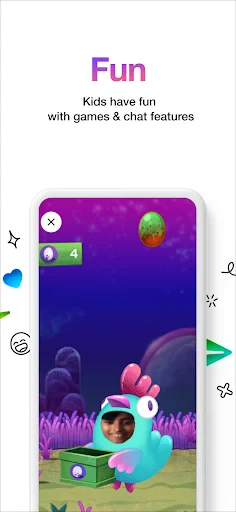
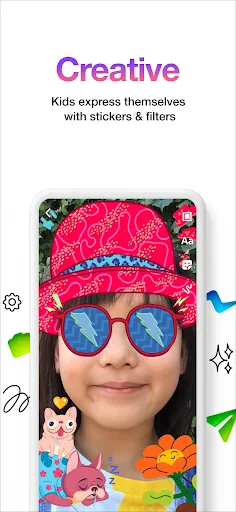
An Initial Parental Review of Messenger Kids
Hello to all the parents out there! Are you familiar with Messenger Kids? This Facebook-created messaging application is specifically designed for children. I decided to give it a try myself to understand its appeal, and I'm ready to share my findings. Let's take a closer look at Messenger Kids together.
Understanding This Child-Friendly Application
Imagine a scaled-down, youth-oriented version of Facebook Messenger. That is the essence of Messenger Kids. It provides a controlled environment for kids under 13 to safely message, video chat, and share content with approved contacts, all under parental supervision. I must say, the parental oversight tools are quite comprehensive.
Examining the Interface and Design
The vibrant, playful aesthetic immediately stands out. It's highly appealing to children, with cheerful animations and intuitively designed menus. The interface is refreshingly simple, allowing kids to navigate it almost instantly with minimal guidance. After all, the goal is to connect with grandparents or friends, not to decipher a complicated layout.
Exploring the Features and Capabilities
Now, onto functionality. Messenger Kids is packed with engaging tools. It offers a library of child-appropriate stickers, GIFs, and creative drawing options. Video calls are reliable and include playful filters to add an extra layer of fun—similar to Snapchat, but curated for a younger demographic. The ability to send voice messages is also a welcome addition.
Prioritizing Safety and Control
Security is paramount, and Messenger Kids addresses this directly. Parents maintain full authority over the contact list, preventing any unapproved communication. The chat history is accessible for parental review, and the inclusion of screen time limits is an invaluable tool for managing device usage.
Personal Insights and Conclusions
Overall, my impression of Messenger Kids is very positive. It successfully balances entertainment with robust safety features. The peace of mind that comes from managing my child's contacts and monitoring activity is significant. The absence of advertisements and in-app purchases is another substantial benefit.
It is worth noting that some administrative controls require a parent's Facebook account, which could be a drawback for non-users. However, this seems a reasonable trade-off for the level of security provided.
In summary, if you are seeking a secure, enjoyable messaging platform to help your child stay connected with family and friends, Messenger Kids is certainly worth considering. I recommend testing it to see if it fits your family's needs.
Pros
- • Parental controls for safe communication.
- • No phone number needed for signup.
- • Interactive stickers and GIFs.
- • Ad-free environment for kids.
- • Video chat with fun filters.
Cons
- • Limited to contacts approved by parents.
- • No option for unsupervised messaging.
- • Requires Facebook account for setup.
- • Limited educational content.
- • Privacy concerns over data usage.
Frequently Asked Questions
Q: What is Messenger Kids?
A: Messenger Kids is a messaging app designed specifically for children. It allows kids to communicate with friends and family in a safe environment. The app is controlled through a parent’s Facebook account, providing a secure platform where parents can monitor and manage their child’s activity. This ensures a safe online communication experience for children.
Q: Is Messenger Kids safe for children to use?
A: Yes, Messenger Kids is designed with safety in mind. Parents have full control over their child's contact list and can monitor messages. There are no ads or in-app purchases, and the app complies with the Children’s Online Privacy Protection Act (COPPA). These features ensure that kids can enjoy a secure and child-friendly messaging experience.
Q: How can parents control their child's Messenger Kids account?
A: Parents can manage their child's Messenger Kids account directly through their own Facebook account. They can approve contacts, monitor messages, and set usage limits. Additionally, parents receive notifications about their child's activity, allowing them to stay informed and maintain a safe environment for their child’s digital interactions.
Q: What features does Messenger Kids offer?
A: Messenger Kids includes a range of features tailored for children. It offers fun filters, emoji, and stickers for creative messaging. Kids can initiate video calls with approved contacts and participate in group chats. The app also provides educational games and activities, making it a versatile tool for communication and learning, while ensuring engagement through entertainment.
Q: Can Messenger Kids be used on multiple devices?
A: Yes, Messenger Kids can be used on various devices, including tablets and smartphones. The app is available for both iOS and Android platforms, allowing children to stay connected on different devices. Parents can manage the app settings across all devices, ensuring consistent safety controls and monitoring, regardless of the device in use.
Information
Similar Apps

Yolla: International Calling
Communication

Phone by Grice
Communication

Numero: Travel eSIM & Numbers
Communication

Phone Dialer - Contacts
Communication

Conversations (Jabber / XMPP)
Communication

Botim - Video and Voice Call
Communication

FAB Adblocker Browser:Adblock
Communication

JusTalk Kids - Safe Messenger
Communication






