
Samsung Internet Browser
Samsung Internet Browser Secure Fast Browsing For Galaxy Users.
Rating
3.6
Installs
1,000,000,000+
Price
Free
Screenshots


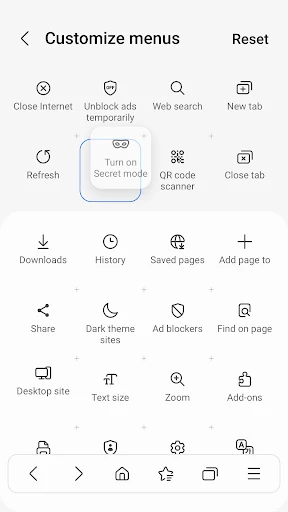
Samsung Internet Browser: A Fresh Take on Web Browsing
Tired of the usual browser options and curious about a capable alternative? Meet the Samsung Internet Browser, a powerful and increasingly popular choice. If it's new to you, consider it a hidden gem in a field often dominated by Chrome and Safari.
Sleek Design and Intuitive Interface
Upon launching the Samsung Internet Browser, its clean and organized layout immediately stands out. The experience is akin to entering a well-arranged space where everything is within easy reach. Its modern design avoids clutter, featuring a straightforward interface that emphasizes user-friendly navigation. This focus on simplicity is ideal for anyone seeking an efficient, hassle-free browsing start.
Powerful Features for Enhanced Browsing
A standout feature from the beginning is the integrated ad blocker, which effectively tackles intrusive pop-ups and banners. Browsing without constant interruptions is a significant upgrade. Support for extensions allows for further personalization, letting you tailor functionality to your needs. The Video Assistant tool is another highlight, optimizing playback and making extended viewing sessions seamless.
Its Secret Mode offers a refined take on private browsing, operating without saving your history or cookies. This provides a discreet and secure way to explore the web whenever privacy is a priority.
Performance and Reliability You Can Count On
Performance is where this browser truly excels. It operates with notable speed, responds instantly to inputs, and handles multiple tabs with impressive stability. Even during research with numerous tabs open, it maintains its responsiveness without crashes or lag. This consistent reliability makes it a strong candidate for all types of daily internet use, from work and study to casual exploration.
Accessibility and User-Centric Customization
A common question is whether this browser is exclusive to Samsung devices. The answer is no; while optimized for them, it is available for all Android users, greatly expanding its accessibility. The inclusion of a Dark Mode is a welcome addition, reducing eye strain in low-light conditions and contributing to improved battery longevity on your device.
Final Verdict: Who Should Consider It?
In a landscape of limited browser giants, the Samsung Internet Browser presents a compelling and feature-rich alternative. It combines robust performance, thoughtful features, and a polished design to create a genuinely enjoyable online experience. Whether you're a tech enthusiast eager to explore or a everyday user seeking a straightforward and capable browser, it is certainly worth a download. Why not take it for a spin? You may just discover your new favorite way to browse the web.
Pros
- • Fast and efficient browsing experience.
- • User-friendly interface with easy navigation.
- • Advanced privacy and security features.
- • Offline reading mode available.
- • Supports extensions and add-ons.
Cons
- • Limited availability on non-Samsung devices.
- • Occasional compatibility issues with websites.
- • Pre-installed on Samsung devices
- • non-removable.
- • Consumes more battery than some competitors.
Frequently Asked Questions
Q: What features make Samsung Internet Browser stand out from other browsers?
A: Samsung Internet Browser offers a unique set of features that distinguish it from other browsers. It has a sleek and user-friendly interface, supports extensions, and includes a built-in ad blocker to enhance browsing speed and security. The browser also prioritizes privacy with its Secret Mode, which allows users to browse without leaving a trace. Additionally, it offers a customizable homepage and supports a variety of web standards, making it versatile for various content types.
Q: Is Samsung Internet Browser compatible with non-Samsung devices?
A: Yes, Samsung Internet Browser is compatible with non-Samsung devices. It is available for download on both Android and iOS platforms, allowing users with different smartphone brands to enjoy its features. This cross-device compatibility ensures a broader user base can benefit from its security features, fast browsing performance, and customizable options. Users can download the app from the Google Play Store or Apple App Store accordingly.
Q: How does Samsung Internet Browser ensure user privacy and security?
A: Samsung Internet Browser places a strong emphasis on user privacy and security. It incorporates features like Secret Mode, which keeps your browsing history private and secure. Additionally, the browser includes a robust anti-tracking mechanism and a built-in ad blocker to prevent unwanted tracking and advertisements. Samsung's commitment to security is evident in its regular updates and patches that protect users against potential vulnerabilities and threats.
Q: Can I sync my data across devices using Samsung Internet Browser?
A: Yes, Samsung Internet Browser allows you to sync your data across devices seamlessly. By signing into your Samsung account, you can synchronize bookmarks, saved pages, and other browser settings across different devices. This feature ensures that your browsing experience is consistent and personalized, whether you're using a smartphone, tablet, or any other compatible device. It enhances convenience for users who frequently switch between devices.
Q: What customization options does Samsung Internet Browser offer?
A: Samsung Internet Browser provides a variety of customization options, allowing users to tailor their browsing experience to their preferences. You can customize the toolbar layout, choose from various themes, and adjust font sizes for readability. The browser also supports a range of extensions for added functionality. These customization options enable users to create a browsing environment that suits their individual needs, enhancing overall usability and satisfaction.
Information
Similar Apps

Eyecon Caller ID & Spam Block
Communication

Messenger - SMS Messages
Communication

Rakuten Viber Messenger
Communication

Sound Amplifier
Communication

Getcontact
Communication

FolderSync Pro
Communication

iSharing: GPS Location Tracker
Communication

Meeting - Video Meeting
Communication






